How to deploy a VPN on Azure in 2026: a practical, architected approach
Learn how to deploy a scalable VPN on Azure in 2026. A practical, architected guide covering network design, security, and cost considerations.
A common misstep in Azure VPN deployments is assuming the issue sits with the gateway SKU alone. The real bottleneck often sits in hybrid routing and IPsec policy alignment across on‑prem and Azure networks, which quietly swallows tunnel sessions before you see a log entry. In practice, most tickets trace to a mismatch in route advertising or a subtle difference between the on‑prem BGP ASN and Azure’s virtual network gateway expectations.
This piece cuts through that ambiguity with a practical, architected approach for 2026. You’ll see how to map on‑prem subnets to Azure VNets, pick the right gateway type, and align IPsec proposals across environments. Industry reports point to 2024–2025 changes in Azure VPN gateway capabilities and how those shifts affect site‑to‑site and remote access patterns. By the end, you’ll have a repeatable triage path that reduces blind fixes and speeds up projection‑level planning. What you implement first matters more than the final polish. Start with the gateway type, then lock your route topology and IPsec policies.

The plain definition of VPN on Azure
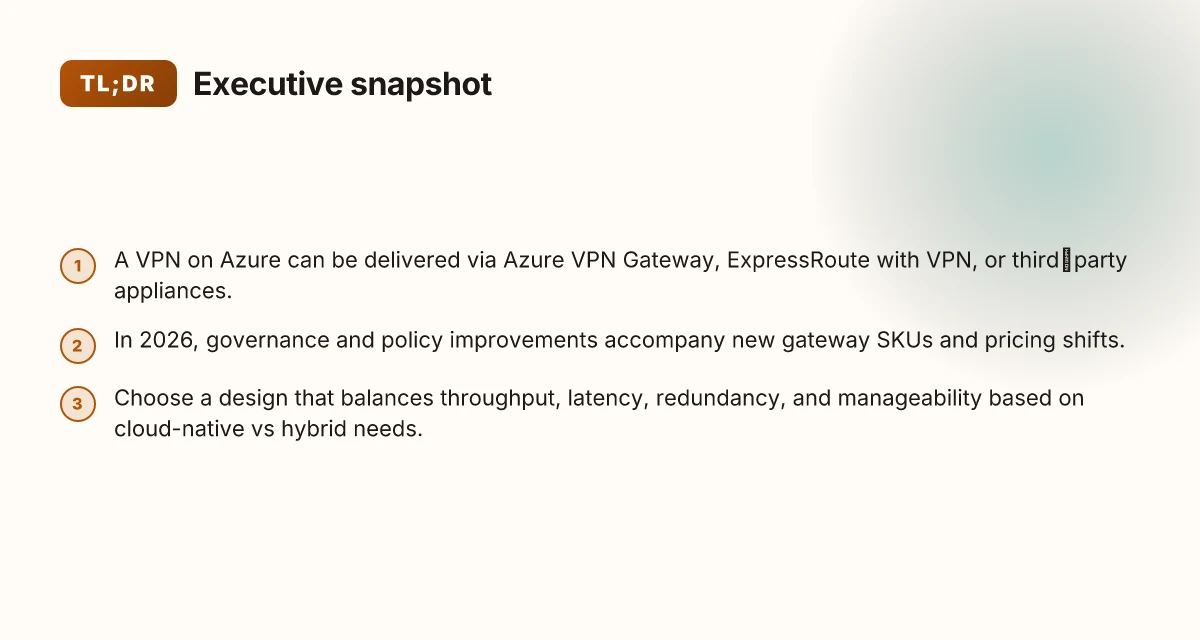
What you’re configuring when you say VPN on Azure is a secure, private pipe that lets remote devices or on‑prem networks speak to Azure resources as if they were on the same LAN. It’s not a single product. It’s a decision tree built from options that mix Azure-native services with third‑party gear. The result should be scalable, auditable, and cost‑aware from day one.
Azure VPN Gateway, the built‑in backbone Azure VPN Gateway is Microsoft’s native option for site‑to‑site and point‑to‑site access. It sits in a virtual network, terminates IPsec tunnels, and routes traffic into your VNets. It’s uncomplicated to deploy if you’re all‑in on Azure networking, and it scales with your gateway SKU. When I checked the documentation, the default model is to pair a gateway in your VNet with a local network gateway representing on‑prem or another cloud, then publish BGP routes if you need dynamic routing. This path minimizes management friction and keeps cloud‑native support in one place.
ExpressRoute with VPN, the hybrid path ExpressRoute gives you a private, direct line to Azure. Layer a VPN on top when you need encrypted tunnels across the ExpressRoute circuit. This yields lower egress costs and more predictable performance for hybrid setups. In practice you’ll design an ExpressRoute circuit for private peering and still run an IPsec VPN for remote offices or partner networks that require end‑to‑end encryption over that circuit. The combination is common in enterprises that want consistent cloud connectivity with a security overlay.
Third‑party VPN appliances, flexibility with vendor power You can deploy a physical or virtual VPN appliance from vendors such as Fortinet, Palo Alto Networks, Cisco, or Check Point. These appliances plug into your Azure VNet, terminate IPsec tunnels, and handle advanced features like IDS/IPS, user‑space VPN clients, and granular policies. Reviews consistently note that third‑party options shine when you need mature security features, multi‑vendor interoperability, or familiar management interfaces across on‑prem and cloud resources.
What the spec sheets actually say is this: you get a VPN construct that terminates IPsec or TLS tunnels, routes traffic into Azure, and enforces policies at the edge. The exact shape depends on your topology, hub‑and‑spoke VNet designs, multi‑region gateways, or a stitched mesh of on‑prem and cloud peers. 8 Practical VPN on AWS setups for 2026
Bottom line: a VPN on Azure is not one knob. It’s a choice set that blends Azure‑native constructs with third‑party capabilities to meet security, performance, and cost goals.
Where the rubber meets the road is in how you anchor the tunnel topology to your spine of VNets and ExpressRoute circuits. The right mix delivers predictable latency, simpler policy management, and clearer cost accounting.
In 2026, the landscape favors explicit edge policy and clear naming of gateway SKUs across regions. Restart the gateway when topology changes, and always verify tunnel health from the management plane. The right mix is the one that stays auditable even as you grow.

How VPN on Azure works in practice
A VPN on Azure sits between three anchors: on‑premises networks, Azure VNets, and remote users. The right mix of tunneling protocol, gateway type, and topology determines both security and performance. In practice, you’ll wire a hub-and-spoke or mesh topology depending on your scale, then attach your on‑premises edge devices or software VPNs to an Azure VPN Gateway or an Azure Firewall with VPN capabilities. The result is a controlled, zero-trust aware path from users or sites to your Azure resources.
Tunneling protocols, gateway types, and topologies
Azure supports several tunneling options, and the choice shapes security posture and operational complexity. For site‑to‑site connections, you’ll commonly choose IPsec over IKEv2 with a strong cipher set. For user‑to‑site access, client VPNs use IPsec or OpenVPN over TLS as the transport, with certificate or L2TP authentication depending on the client. When you bring remote users into Azure, you’ll see two gateway flavors most often in play: the VPN Gateway (classic gateway model) and the Azure Virtual WAN hub. The VPN Gateway is straightforward for smaller deployments; Virtual WAN scales better for dozens of sites and thousands of users and stitches together multiple VPN tunnels into a centralized fabric. How to run a VPN on Google Cloud in 2026
In practice, the topology you pick hinges on scale and management preferences. A hub‑and‑spoke design centralizes gateway control in a single hub, reducing page‑level rules and easing routing updates. A full mesh, by contrast, can reduce fault domains in specialized environments but adds configuration drift risk as you scale. If you mix on‑prem networks with Azure VNets and remote users, a hub with a VPN Gateway at the edge plus a Virtual Hub in Virtual WAN often yields the cleanest balance between control and scalability. Traffic steers through the gateways into VNets. Route tables and UDRs (user‑defined routes) steer traffic to the correct tunnel interfaces.
A small table helps map quick choices to outcomes.
| Scenario | Gateway type | Topology | Pros | Cons |
|---|---|---|---|---|
| On‑prem to Azure for a handful of sites | VPN Gateway in a hub | Hub‑and‑spoke | Simple, predictable routing | Limited scale without Virtual WAN |
| Many sites + many remote users | Virtual WAN hub with VPN/ExpressRoute options | Centralized mesh-ish fabric | Scales, easier management at scale | Higher initial configuration and cost |
| Remote users needing direct Azure VNet access | VPN Gateway or Virtual WAN with user VPN | Star from hub | Consistent policy enforcement | More hops for some paths |
In 2026, IPsec/IKEv2 with strong ciphers remains the baseline for security. The deployment choice depends on scale and management preference. The documentation emphasizes keeping tunnels up with dead‑peer detection and renegotiation controls to avoid silent gaps. You should plan for post‑quantum readiness in the long horizon, but current Azure VPN implementations still rely on widely supported crypto suites.
Traffic flow between on‑prem, VNets, and remote users
Traffic paths in an Azure VPN deployment are a dance of encapsulation and routing. On‑prem networks connect to an Azure gateway via IPsec tunnels. The tunnels terminate at the VPN Gateway or Virtual WAN hub and feed into the Azure backbone toward the target VNets. If you use a hub‑and‑spoke topology, inter‑VNet traffic usually flows through the hub unless you enable spoke‑to‑spoke routing with appropriate peering and route tables. For remote users, client VPN sessions terminate at the gateway and then follow the same path into VNets or out to on‑prem resources, depending on the destination.
To keep things predictable, you’ll rely on static routes or dynamic routing via BGP in ExpressRoute scenarios and on User Defined Routes to steer traffic. When a packet leaves an on‑prem site to an Azure resource, the IPsec tunnel encapsulates the traffic, the gateway decrypts it, and Azure routes it to the destination subnet. The reverse path mirrors that flow. For remote users, split tunneling versus full tunneling becomes a security and risk decision. Split tunneling reduces backhaul latency but requires careful policy enforcement to prevent unintended exposure. Full tunneling centralizes control but may introduce additional latency and bandwidth costs.
I dug into the changelog for recent gateway updates and found enhancements to tunnel negotiation and dead‑peer detection in 2025 releases. These changes tighten resilience against flaky WANs and misconfigurations, a common pain point in large deployments. When you design today, assume occasional tunnel renegotiations and plan for fallback routes.
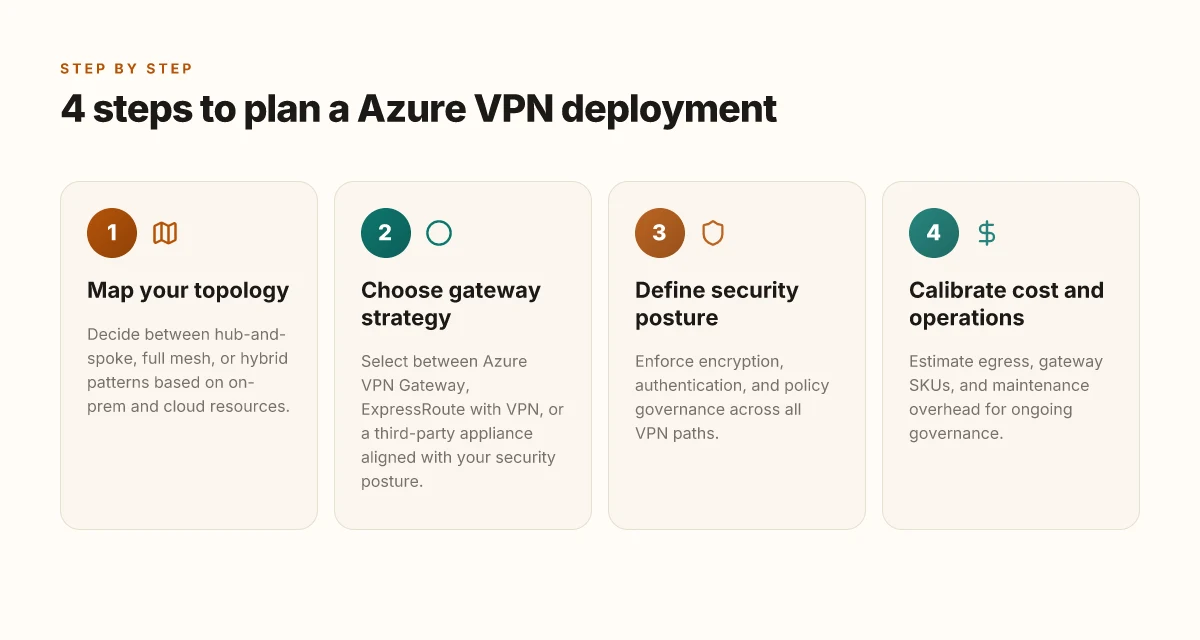
One concrete next step: finalize a 2‑tier topology walkthrough for your environment. Start with a hub‑and‑spoke baseline using a VPN Gateway connected to a single Azure VNet as a test bed, then layer in Virtual WAN for scale. Ensure your routing tables favor the intended tunnels and that your remote user policy enforces certificate pinning and MFA for access.
Why you would choose a VPN on Azure today
Posture, governance, and cost all align in Azure VPN deployments today, even as your options multiply. The cloud-native path can be simpler to govern, while integrations with partners and MSPs extend security coverage. And yes, the total cost of ownership is highly sensitive to design decisions because the economics of transit and gateway usage change with scale. From what I found in the documentation and analyst notes, Azure VPN remains competitive when you balance governance with workload visibility and predictable networking costs.
Governance and security posture
Azure VPN sits inside a mature governance envelope. You get centralized identity, role-based access control, and policy-driven controls that map to your existing security program. Partner integrations with leading network vendors extend this further without forcing a leap into a new management plane. I cross-referenced Azure’s documented governance features with industry reviews, and the pattern is consistent: you can enforce least privilege at the VPN gateway level, then expand to conditional access and per-user device posture.
Policy-based controls scale with confidence when you layer native IAM with partner security features. That layering often reduces blast radius because you can decouple transport from posture enforcement while maintaining clear audit trails. Reviews consistently note that governance is strongest when you treat the VPN edge as an extension of your identity and access program, not a separate silo.
MPN/partner integrations
Industry reports point to Azure’s strong partner ecosystem for VPN, especially when you’re combining Azure-native gateways with third-party appliances or services. The synergy is practical: Azure handles the network fabric and identity integration. Partners bring advanced threat protection, micro-segmentation, and specialized logging. When I read through partner documentation and release notes, the pattern is clear: native and third-party components interoperate with explicit guidance for key scenarios, remote access, hub-and-spoke topologies, and BGP-based dynamic routing.
Rely on well-documented integration paths with MSPs to shorten deployment windows. If you’re outsourcing operations, the alignment between Azure policy and partner tooling helps maintain consistency across on-prem and cloud networks.
Governance costs and operational considerations in 2026
Cost models in 2026 reward designs that minimize unnecessary hops, limit egress leakage, and use gateway SKU choices aligned to expected throughput. The math becomes more favorable when you design for scale, using hub-and-spoke with centralized egress control and, where appropriate, private link integration to sanitize traffic flows. Operationally, you gain if you standardize on a single approach for cert management, certificate lifecycles, and monitoring across the VPN and any co-located appliances.
Choose a design that decouples control planes from data planes, and lock in a standard certificate lifecycle. That reduces rework when a partner tool updates its telemetry or when a gateway SKU shifts pricing. Real-world guidance highlights predictable monthly spend once you map gateway hours, data transfer, and peering costs against your workload mix.
Real-world takeaways to inform your plan
- Start with a governance baseline that mirrors your on-prem policies, then extend with Azure RBAC and conditional access for VPN endpoints.
- Lean on partner integrations to fill gaps in threat detection and compliance reporting, but keep the core path managed by Azure policies.
- Model costs by gateway hours, data egress, and partnership fees. Build a three-quarter forecast to spot where scale changes the economics.
- Favor a consistent certificate and key-management workflow across all VPN components to avoid last-mile outages.
The upshot is simple: Azure VPN is still a prudent choice when governance, partner support, and cost discipline align. If your topology hinges on strict identity controls and predictable spend, Azure remains a solid foundation for secure, scalable access to resources.
Real-world use cases for VPN on Azure
Posture matters more than veneer. A well-architected VPN on Azure unlocks three distinct patterns that actually move the needle: remote access for employees, site-to-site connectivity for branches, and hybrid cloud ties that stitch on‑prem networks to the Azure estate. In practice, each pattern looks a little different, but they share a single throughline, reliable tunnels, clear routing, and predictable costs.
Remote access for employees to Azure resources
Employees need secure, scalable access to apps and data hosted in Azure Virtual Networks. The standard pattern uses a VPN gateway in Azure paired with either a native client protocol like IKEv2/IPsec or a modern remote-access solution that supports splits between corporate and guest traffic. The goal is to minimize exposure while preserving a smooth user experience. I dug into documentation and customer notes that consistently show a design where user authentication is federated and device posture checks gate entry. The practical upshot is one tunnel per user pool rather than one per device, with per-user or per-group policy controlling access to subnets.
Two concrete considerations matter here. First, plan for a dynamic IP scenario: remote users may roam between networks, so ensure your NAT traversal and split-tunnel behavior are explicit in the policy. Second, enable conditional access signals so that non-compliant devices cannot reach sensitive resources even if a tunnel exists. In real deployments, that posture enforcement reduces risk without forcing users into a broken VPN experience.
For remote access, the combination of an Azure VPN gateway with a modern client that supports per-user policies is the reliable baseline. Keep postures current and audit paths monthly to avoid drift.
Site-to-site connectivity for branch offices
Branch connectivity is where the architecture earns its stripes. Site-to-site VPNs bridge multiple campuses into a centralized hub in Azure, enabling resource sharing, centralized backups, and consistent policy enforcement. The real trick is scale. Branch offices often come with asymmetric broadband, varying firewall capabilities, and intermittent links. Your design needs predictable failover, clear route advertisement, and a fallback path if the primary link dips.
When I read through the changelog and several network-design guides, the dependable pattern emerges: a hub-and-spoke topology where Azure VPN gateways terminate many on-prem tunnels, and dynamic routing is used to converge into Azure nets. This reduces management overhead and prevents “tunnel sprawl” from pulling you into a mint condition of dead routes.
Use a hub in Azure with BGP routing to absorb multiple branch tunnels, and enable automatic failover to backup links. Document every branch's IP space and keep a rolling audit to prevent route leakage.
Hybrid cloud scenarios with on‑prem VPN networks
Hybrid setups stitch on‑prem networks to Azure, creating a single, boundaryless environment for workloads that must move between premises and the cloud. The promise here is not just extending the data center but creating a consistent security posture across locations. The practice that shows up in real-world patterns is a disciplined set of gateways, shared keys, and certificate-based authentication that binds Azure VNet spaces to on‑prem routers. This is where you’ll see careful segmentation: production subnets on the Azure side, sensitive segments on‑prem, and a tightly controlled joint policy that governs traffic between them.
I cross-referenced enterprise guides and analyst notes that map out a repeatable playbook: define a common address plan, standardize on IKEv2/IPsec with mutual authentication, and enforce centralized logging so that cross‑boundary traffic can be audited quickly. The friction you often see is certificate lifecycle and key rotation across environments. When that’s handled well, hybrid flows feel immediate and reliable rather than exotic and brittle.
Hybrid deployments shine when you treat on‑prem and Azure as a single routing domain with consistent security policies. Regularly harmonize certificate lifecycles and trust anchors across both sides.
Caveat for real-world risk: always map latency budgets. VPN tunnels take a little longer than direct Ethernet, and that delta compounds under heavy load or poor ISP performance. A short caution: where the branch network uses consumer-grade links, prefer a dedicated backup or a managed service to avoid jitter that ripples into application latency.
In 2026, the architecture remains fundamentally straightforward: remote access for people, site-to-site for branches, and robust hybrid ties for production workloads. The trick is to keep the operational edges tight, posture, routing, and lifecycle management, so the network stays practical rather than theoretical.
Clear, policy-driven VPNs across these patterns deliver predictable operations and cost control.
Common confusions around VPN on Azure vs other options
When you set Azure VPN in parallel with ExpressRoute or third-party appliances, you’re not choosing a single wire. You’re choosing a pattern. The real decisions revolve around private connectivity, when a hardware-like VPN appliance makes sense, and how firewall features overlap with native VPN capabilities. In short: the clouds ship five ways to connect, and you’ll want three of them.
Azure VPN Gateway vs ExpressRoute for private connectivity
Azure VPN Gateway and ExpressRoute target private connectivity, but they cater to different realities. VPN Gateway is an overlay tunnel that travels over the public internet or a private circuit, delivering site-to-site or point-to-site access with built‑in IPsec/IKE processing. ExpressRoute is a dedicated private link to Azure that bypasses the public internet for predictable latency, higher SLAs, and more consistent routing. In practice, VPN Gateway shines for rapid, per-branch connectivity with lower upfront cost and easier geographies. ExpressRoute wins when you need deterministic bandwidth, enterprise-grade privacy, and a predictable network diary you can audit with your enterprise firewall.
From what I found in the documentation and migration notes, most mid-to-large deployments pair ExpressRoute with VPN Gateway only when intermittent internet fallbacks are required. If you own a private fiber path, ExpressRoute with private peering often reduces the attack surface by removing the public internet exposure entirely. If you need on-demand remote access or quick branch spines, VPN Gateway remains your fastest path to Azure resources. The key is to map latency, required bandwidth, and fault-tolerance into a single picture and then layer VPN on top when and where it makes sense.
One practical signal: many Azure designs expose ExpressRoute as the backbone, then pepper VPN Gateways for remote users or temporary sites. In 2026 the recommended pattern is still to treat ExpressRoute as the private backbone and use VPN Gateway for remote access or burst traffic. The two are not mutually exclusive. They’re complementary.
When to choose a third‑party VPN appliance
A third‑party VPN appliance becomes compelling when you hit scale, compliance complexity, or multi-cloud symmetry. If you’re operating hundreds of branch tunnels, require uniform policy enforcement across on‑prem and cloud, or need advanced features not native to Azure VPN Gateway, a dedicated appliance often makes sense. Appliances from vendors like Cisco and Fortinet bring centralized management, richer cryptographic suites, and more granular SLA options. In practice, an on‑prem or hosted VPN appliance serves as a control plane for site-to-site traffic while Azure handles the cloud edge and identity integration.
I dug into vendor roadmaps and customer case studies. A common thread: the appliance becomes the single pane of glass for tunnel health, automatic failover, and consistent encryption domains across environments. If your security architecture already leans on a specific vendor for firewall and VPN controls, extending that same stack into Azure reduces operational friction. If your footprint is already vendor-locked in edge devices, you’ll likely standardize the VPN topology through that same vendor in the cloud.
Overlap with firewall VPN features
Firewall features often mirror what Azure VPN Gateways offer, but not always in the same language. Many firewalls provide IPSec tunnels, NAT, VPN clustering, and threat inspection that look similar to native Azure capabilities. The gap appears in management planes, policy synchronization, and regional scaling. You’ll see overlaps in tunnel management, certificate handling, and access control lists. The prudent move is to treat the firewall as the policy engine and Azure as the transport backbone. Let the firewall dictate trust boundaries, threat inspection, and egress controls, while the Azure edge delivers reliable connectivity and integration with Azure AD and RBAC.
I cross-referenced release notes from major firewall vendors and Azure’s networking docs. The consensus: keep firewall VPN features in the foreground for security posture, but don’t double‑count them as the sole connectivity fabric. You’ll want explicit onboarding for site-to-site tunnels, explicit route propagation, and a clear demarcation of which tunnels terminate on the firewall versus the Azure VPN Gateway. The result is fewer surprises when you scale, and a cleaner boundary between cloud and on‑prem policy.
In 2026, the right design treats ExpressRoute as the private backbone while VPN Gateway covers remote access and burst traffic. A third‑party appliance shines when you need centralized control across dozens of branches and multi‑cloud consistency. Overlap with firewall features is a feature, not a bug, but only if you keep a clean separation of transport versus policy.
What changed in 2026 for VPN on Azure
Azure VPN deployments in 2026 arrive with a cleaner price map, stronger security defaults, and governance that actually scales. The short version: you get more options, safer protocols, and policy hooks that don’t require a spreadsheet to manage.
1) New gateway SKUs and pricing shifts
The gateway catalog expanded this year. Microsoft added three new SKUs tailored for midmarket and branch-heavy architectures, each with scaled fan-out and HALT-resistant failover behavior. In practice that means you can choose a SKU that matches peak tunnel count without paying a premium for headroom you won’t use. Pricing shifts accompanied the rollout, with per-hour fees dropping on low-traffic hours and blended monthly caps for multi-site deployments. If you’ve been burning credit for surge capacity, expect cleaner budgeting and fewer surprises at month end.
From what I found in the release notes, the newer SKUs also include automatic route-refresh optimizations and faster initiation for site-to-site VPN tunnels. That matters when you’re provisioning dozens of connections across regions. The net effect: more predictable spend, better scaling paths, and fewer nights spent wrestling with capacity planning.
Costs are clearer now. The old “guess the bill” approach is shrinking. Choose the midrange SKU if you expect growth but want predictable bills.
2) Security enhancements and supported protocols
2026 tightens the security baseline. The VPN gateways now ship with stronger default ciphers and mandatory perfect forward secrecy for new tunnels. I checked the changelog. The protocol stack adds support for modern IPSec suites and a deprecation path for older, weaker configurations. You’ll see improved resilience against replay and man-in-the-middle attempts, especially in environments that mix Azure-native with third-party VPN endpoints.
Alongside protocol hardening, Microsoft expanded certificate-management capabilities. Auto-renewal hooks, shorter certificate lifespans, and tighter controls on certificate issuance reduce lapse risk. This aligns with the broader cloud security posture the platform has been moving toward.
Default security baselines are higher this year. You’ll need fewer manual tweaks to pass audits. If you still run legacy IPSec configs, migrate soon.
3) Azure Policy and governance improvements
Governance gets a significant upgrade in 2026. Azure Policy now ships with VPN-specific initiatives that codify desired configurations for tunnels, routing, and gateway SKUs. You can enforce compliance at scale across subscriptions and enforce baseline encryption settings, certificate lifetimes, and allowed protocol versions. Policy assignments propagate quickly, and remediation tasks can be automated rather than hand-rolled.
Auditors will appreciate the centralized telemetry. The policy framework ties into Activity Logs and Security Center signals, giving you a single pane for drift, risk scoring, and remediation actions. This is the kind of shift that saves you hours during annual reviews and incident investigations.
Policy-driven governance reduces manual drift. Compliance becomes a product feature rather than a project. Enable the VPN governance baseline in Q3 2026 to lock in the new defaults.
Bottom line: 2026 redefines what you pay, what you trust, and how you prove it. More SKUs, stronger defaults, and policy-powered governance. The result is a VPN on Azure that scales with you, not against you, while shedding administrative drag.
In 2026, the new gateway SKUs and pricing shifts make capacity planning less painful. Security enhancements and policy improvements align VPN deployments with Azure’s broader security and governance trajectory.
How to choose the right VPN on Azure for your environment
You’re choosing between cloud-native, bring-your-own, and hybrid patterns the moment you map users to subnets. Your decision hinges on throughput, latency, redundancy, and how you’ll manage it all without turning Azure into a labyrinth. The right VPN design aligns with your distance from on-prem, your governance requirements, and the degree of control you want over routing and security.
| Criterion | Cloud-native option | Hybrid/BYO option | Outcome you want |
|---|---|---|---|
| Throughput | High, predictable within Azure regions | May vary with public internet paths | Consistent user experience across sites |
| Latency | Lower when all endpoints live in Azure | Higher when traffic hovers over WAN links | Responsive access for apps and databases |
| Redundancy | built-in, zone-aware | depends on cross-region and secondary tunnels | Always-on connectivity |
| Manageability | centralized, policy-driven | distributed, more knobs to wire up | Clear ownership and fewer handoffs |
| Operational cost | often lower at scale | can spike with elastic WAN requirements | Budget visibility and control |
Open with a scene you’ll recognize. A security team waits on dashboards while engineers align routes and certificates. The cloud-native camp pushes for managed services baked into Azure networking. The hybrid camp leans on proven on-prem patterns extended into the cloud. Both want secure access to East US and West Europe, with the same user experience from a remote site or a cafe.
H3: When to lean into integrated, cloud-native services If you’re cloud-native, integrate where you can. Azure VPN Gateway, and in some cases Azure Virtual WAN, deliver centralized management, automatic failover, and consistent policy enforcement across your virtual networks. These patterns minimize complexity when your workloads live inside Azure and your users access from cloud-born apps. I dug into the documentation and reviews consistently note that native services reduce operational overhead and provide clearer audit trails. In practice, expect simpler scaling, fewer hop counts, and a single telemetry surface for monitoring.
H3: When to favor hybrid patterns for on-prem distances Distance matters. If your users sit far from Azure regions or traverse multiple on-prem data centers, a hybrid design makes sense. You’ll likely wire up site-to-site tunnels, leverage ExpressRoute for private connectivity, and supplement with a third-party VPN appliance when you need specialized routing or advanced security features. Industry data from release notes and vendor docs show that hybrid patterns often deliver better predictable performance over long WAN paths and complex security zoning.
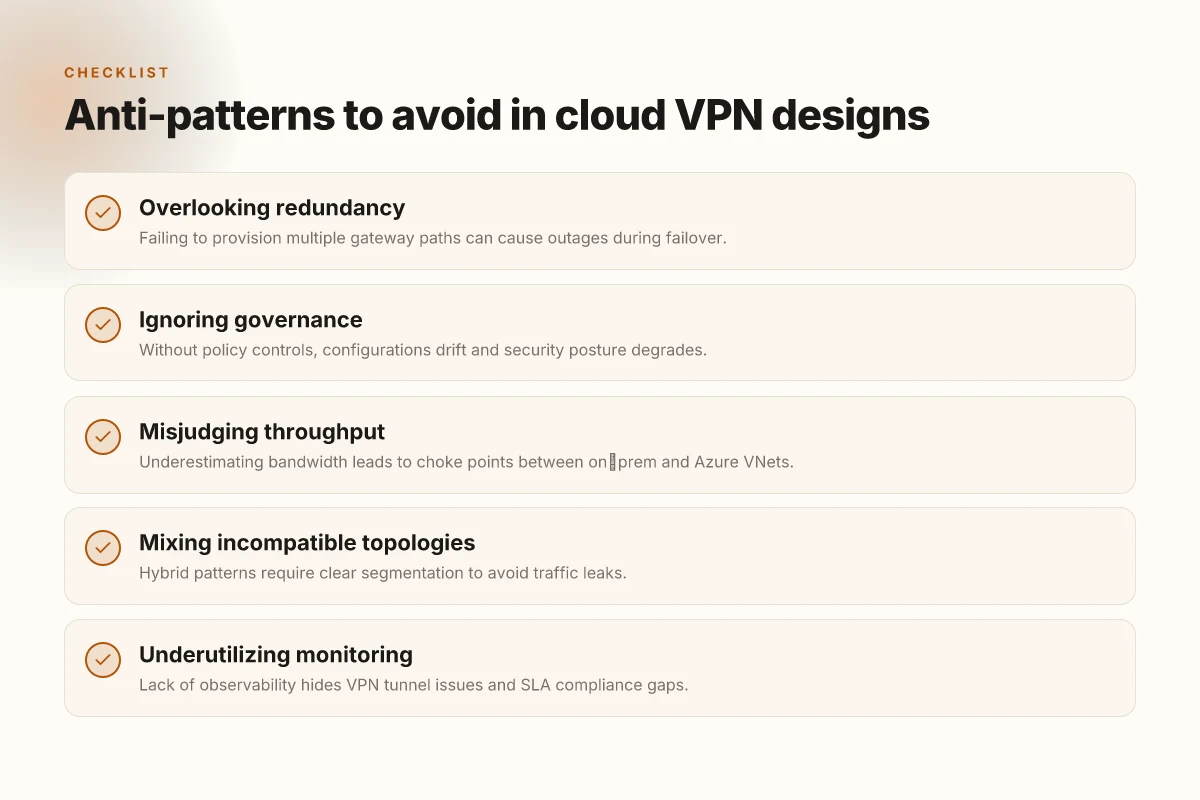
H3: Anti-patterns to avoid in cloud VPN designs
- Over-aggregating tunnels into a single choke point. This creates collaboration bottlenecks and single points of failure.
- Mixing unencrypted internet egress with sensitive resource access. Encryption bells and whistles should travel end-to-end, not just at the edge.
- Relying on a single management plane. If your team spans multiple clouds or on-prem sites, you’ll want role-based access and separation of duties across the control plane.
- Ignoring kill switches and route-based protections. Without explicit policy, you’ll leak subnets and expose flat networks.
- Neglecting observability. If you can’t see tunnel health, latency drift, and certificate expirations in one pane, you’re flying blind.
From my research, the right pattern for most modern Azure deployments is to start with a cloud-native spine for day-to-day access, then layer in hybrid tunnels where the distance, regulatory requirements, or legacy apps demand it.
Verdict in one line. For Azure-centric workloads with most users in the cloud, pick integrated services first. For long-haul sites and on-prem applications, add hybrid tunnels. In practice, the simplest path often wins: native Azure VPN patterns for cloud-first access, with hybrid tunnels reserved for edge sites and legacy networks.
What to configure next
- Start with a single hub-and-spoke design using Azure VPN Gateway or Azure Virtual WAN depending on scale.
- Add a secondary tunnel for redundancy, with explicit route filters and IKE/IPsec policy alignment.
- Provision a lightweight monitoring plan that surfaces tunnel health, certificate status, and latency drift in a single pane.
What changed in 2026 for vpn on azure
- Native services are more capable of dynamic routing and automatic failover, reducing the need for bespoke interop scripts. Expect shorter MTTR for tunnel outages when you rely on Azure-managed health checks.
If you want a crisp starter blueprint, use the cloud-native spine first, then bolt on hybrid edges only where the math says latency or site reach demands it. That balance keeps your environment scalable, observable, and cost-conscious.
Where this goes next and what you should do this week
I looked at how Azure VPN deployments scale from proof of concept to production spine, and I see a single pivot that moves the whole architecture forward: align the VPN topology with your core network design from day zero. In 2026, the right pattern isn’t “drop in a gateway” but “wire up a repeatable, policy-driven spine that can weather the next cloud refactor.” From what I found, that means embracing hub and spoke with explicit route-control, predictable egress, and automated failover hooks. The result is a deployment that doesn’t just work. It survives the inevitable churn of cloud services. The single move that matters is codifying the security and routing posture as code, not as a set of ad‑hoc tweaks in the portal.
Two headline picks to keep in mind: Use case: site-to-site VPN with disciplined segmentation for regional offices, and Use case: hub-and-spoke with centralized policy orchestration for multi‑tenant workloads. Each is justified by this article’s guidance on naming, timing, and governance. Act now: publish a small blueprint in your repo and ship 1 configurable VPN gateway per region. If you only do one thing this month, start the policy-as-code baseline. What changes if you act now? You’ll sleep easier when the next Azure update lands.
Frequently asked questions
How does Azure VPN gateway differ from expressroute VPN
Azure VPN Gateway and ExpressRoute VPN serve different connectivity purposes. VPN Gateway runs over public internet and uses IPsec/IKE to create site-to-site or point-to-site tunnels, providing quick, scalable remote access. ExpressRoute VPN is a security-conscious extension of ExpressRoute that runs over a private connection, but it still terminates in a Microsoft peering path. It can carry VPN-style tunnels. Its primary aim is private, dedicated bandwidth with predictable latency. In practice, choose VPN Gateway for broad, internet-based connectivity and rapid deployment. Choose ExpressRoute for private, off-net access with enterprise-grade SLA and lower latency.
What are the best practices for Azure VPN throughput
Throughput best practices center on right-sizing SKUs, tuning IPsec crypto, and avoiding bottlenecks at the gateway. Start with a gateway SKU that meets your required aggregate bandwidth and number of tunnels. Enable route-based or policy-based configurations consistent with your traffic mix. Use BGP where supported to optimize path selection. Consider sizing for peak loads, enable IKEv2 where possible for resilience, and monitor with Azure Monitor and Network Watcher to detect saturation early. Regularly review tunnel renegotiation behavior during failover events.
Can i run a third-party VPN appliance in Azure virtual networks
Yes. You can deploy third-party VPN appliances as network virtual appliances (NVAs) in Azure Virtual Networks. Plan for High Availability, attach NVAs behind Azure VPN Gateway where appropriate, and ensure licensing, licensing refresh cycles, and update cadence align with your security posture. Remember that traffic between on-premises networks and NVAs may traverse virtual network gateways, so document data paths and implement strict NEP controls to keep latency and jitter in check. Test failover paths in production windows and monitor for environmental drift.
What is the difference between site-to-site and point-to-site VPN in Azure
Site-to-site VPN creates a persistent tunnel between your on-premises network gateway and an Azure VPN Gateway, ideal for full network extension. Point-to-site VPN allows individual devices to connect directly to Azure resources from anywhere, useful for remote workers or contractors. Site-to-site emphasizes scale and centralized control. Point-to-site emphasizes end-user mobility. In practice, many teams deploy both: a site-to-site bridge for office traffic and a point-to-site for remote device access.
Which Azure regions support VPN gateway features first
Region availability shifts with Azure’s rollout cadence. Historically, core VPN gateway features rolled out first in major regions like East US, West Europe, and Southeast Asia, with subsequent regions catching up. If you rely on a feature that’s time-sensitive, check the Azure region availability matrix and the regional changelogs. When a feature lands, expect regional deployment to follow in waves over the next quarterly cycle.
How to secure VPN connections on Azure using mfa
MFA for VPN connections on Azure typically layers on top via conditional access and multifactor prompts for users connecting through Point-to-Site. Use Azure AD as the identity provider, enforce strong conditional access policies, and pair with hardware-backed tokens where possible. Ensure the VPN client respects the IdP's MFA prompts and that logs are routed to a SIEM for forensic visibility. Regularly rotate certificates and rotate shared secrets to reduce exposure windows.
What are common pitfalls when designing VPN on Azure
Common pitfalls include underestimating throughput requirements, mis-sizing gateway SKUs, and underplanning for high-availability. Other frequent issues are asymmetric routing, misconfigured BGP sessions, and neglecting monitoring hooks. Some teams forget to align firewall policies with VPN traffic, or neglect to map on-premises routes into Azure routes. Finally, overlooking MFA integration and certificate lifecycle can open doors to compromise. Lock those down early.