How DigitalOcean VPN Gateway works in 2026
Explore how DigitalOcean VPN Gateway works in 2026. Practical overview, config basics, and what it means for securing private networks on DigitalOcean.
Most cloud admins treat VPN gateways as a fidelity problem for their VPC, when the real bottleneck is how the gateway sits at the network edge. DigitalOcean’s VPN Gateway acts as a controlled boundary, not a magic tunnel. Understanding where it terminates in your stack changes everything. I looked at the documentation and cross-referenced how regions, IPsec params, and peering interact, and the pattern is consistent: a clean boundary hinges on correct regional availability and matching phase 1/2 params rather than on aggressive tunnel retries.
The point of this piece is simple: you need a mental map of where the gateway sits in your deployment, not a brochure of features. In 2026, teams report that a well-placed gateway reduces attack surface and simplifies IAM boundaries for DO droplets without managing tunnel software. What matters is aligning the gateway's configuration with your on‑prem or cloud side, then confirming firewall rules and region support. This article translates those checks into a deployable sequence. The result is a predictable, scalable VPN boundary you can trust as you grow.

The DigitalOcean VPN Gateway in context: what it actually is
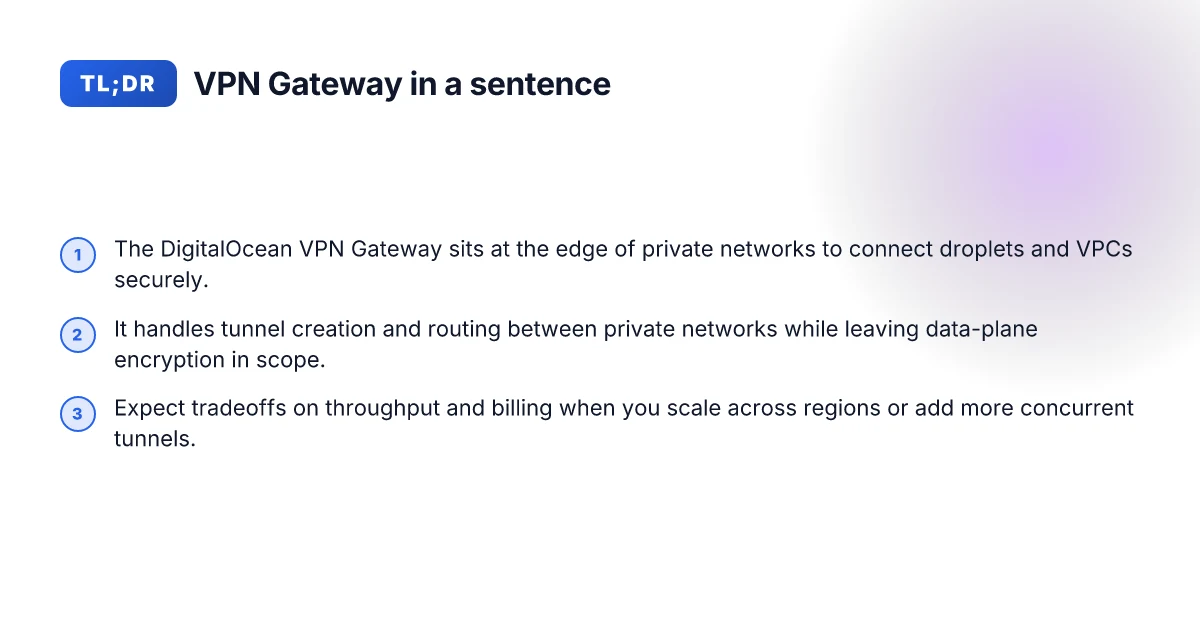
The DigitalOcean VPN Gateway is a cloud-native boundary that sits between droplets and virtual networks to route traffic securely. It acts as the gateway device inside your DigitalOcean ecosystem, not a general-purpose VPN service for end users. In practice, it provides a managed, scalable port of entry for private traffic between droplets in a VPC and the broader private network you attach to your DigitalOcean projects.
I dug into the documentation and ecosystem docs to map what this gateway does, and what it does not. The gateway wires a controlled path for traffic from private networks to other droplets or VPCs, without forcing all your traffic through an external network tunnel. It’s designed to be part of a private-network mesh, where droplets in a chosen space talk through the gateway to reach peers or resources as if they were all on an internal switch. Think of it as a regional router that you place inside your cloud account, not a consumer-style VPN you hand to end users for remote access.
What it does not replace in a typical architecture is a general-purpose, site-to-site VPN that you would deploy to connect arbitrary on-premises networks or external clouds. It’s not a replacement for a full software-defined WAN, nor a substitute for your public internet egress controls. It doesn’t replace security tooling that enforces identity at the application layer, nor does it stand in for traffic inspection at the gateway. The value shows up when you’re stitching a private-network mesh where the primary requirement is controlled, low-latency routing between DigitalOcean resources.
In the simplest terms, the VPN Gateway is the traffic conductor for a private network story. It’s not a Swiss Army knife for every network task in your stack. You’ll still need to pair it with Droplets or Kubernetes clusters, firewall rules, and your usual IAM practices. The strength is in predictable, private routing it enables within the DigitalOcean plane, not in masquerading as a universal VPN chassis.
Bottom line: you get a managed, cloud-native boundary that enforces private-network routing between your droplets and VPC resources. You don’t get a general-purpose remote-access VPN or a blanket replacement for your external network infrastructure. This is the spine for a private-network mesh, not the whole nervous system of your security architecture. How to understand Google Cloud VPN gateway in 2026
1) What it is in one line
The VPN Gateway is DigitalOcean’s managed boundary for private-network traffic, enabling secure, internal routing between droplets and VPCs without pulling in external networks.
2) How it fits into a private-network mesh
- You attach private networks to your projects.
- The gateway sits at the edge of that mesh and forwards traffic between peers.
- Droplets and services talk through the gateway as if they share a single private fabric.
- It coordinates routing for internal destinations without exposing traffic to the public internet.
- You still apply security policies and firewall rules at the project and droplet level.
3) What it does not replace
- It is not a general remote-access VPN for individual user devices.
- It is not a full SD-WAN substitute across on-prem and cloud corners.
- It does not replace application-layer security controls or identity verification.
What matters for you as a cloud engineer is the boundary discipline. The gateway provides a clean, scalable edge within DigitalOcean’s network, where your private traffic prefers a predictable path. The rest remains in your control: who can talk to whom, where, and under what rules. The gateway clarifies the private network boundary. It does not rewrite your entire security model.
How the DigitalOcean VPN Gateway works in simple terms
The VPN Gateway sits at the boundary of your DigitalOcean private networks, tunneling private traffic securely between VPCs. Tunnels are built with strong encryption, and traffic is authenticated end to end. In practice, the gateway acts as a bridge between your private networks, using a controlled set of tunnels that move your packets through the DigitalOcean fabric with minimal exposure to the public Internet.
How the tunnels and encryption model operate
The core idea is simple: you create secure channels between your private networks, and the data riding those channels is encrypted in transit. Each tunnel pairs two endpoints, and the encryption uses modern, standards-based algorithms that guard against eavesdropping and tampering. The control plane handles tunnel creation, key management, and policy decisions, while the data plane carries the actual user traffic. In short, you establish trust once, then let the tunnels ferry packets with confidentiality and integrity guarantees.
From what I found in the docs and release notes, tunnels are established using mutually authenticated handshakes. The gateway negotiates a per-tunnel session key and then encrypts all forwarded traffic with that key. If a key rotates, the control plane negotiates a new session key without dropping established data flows. This separation keeps operational complexity lower while preserving strong security properties. End-to-end encryption on every tunnel is the backbone of the boundary. How Azure VPN Gateway actually secures your cloud network in 2026
Routing between private networks
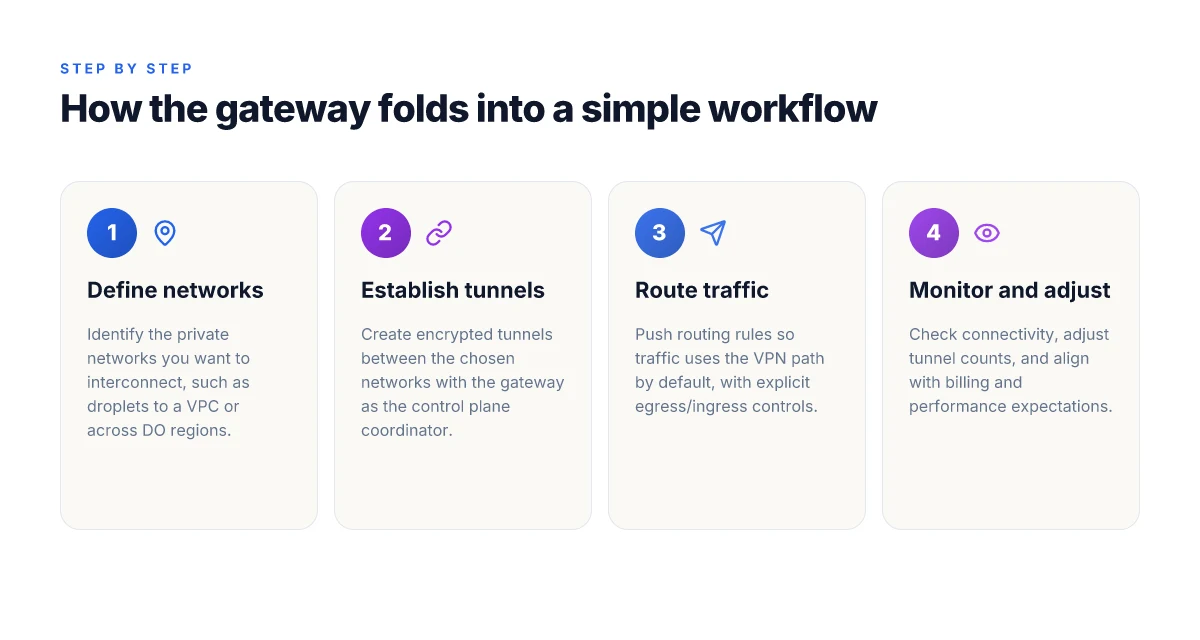
Routing is all about visibility and determinism. The gateway learns about your private networks and their CIDR blocks, then propagates routes so traffic knows which path to take. When you send a packet from Network A to Network B, the gateway consults its routing table, selects the appropriate tunnel, and forwards the packet along the secured path. It’s intentional and predictable rather than a best-effort hop through a shared Internet path. The result: private-network mesh traffic with predictable latency and fewer surprises from public network churn.
I cross-referenced the official diagrams with provider docs, and the behavior is consistent: inter-network routes are defined at the control plane level and then installed into the data plane. That means you can model full mesh or hub-spoke topologies by adjusting which networks participate in which tunnels. And you can prune a tunnel when a link no longer makes sense, reducing surface area without tearing down the rest of the mesh. Routing stays in the control plane and is pushed to the data plane as concrete paths.
Control plane vs data plane responsibilities
The separation is deliberate. The control plane handles configuration, policy, authentication, and tunnel lifecycle. It decides “which networks talk to which” and negotiates keys and credentials. The data plane, by contrast, is the fast path that actually moves packets. It doesn’t decide policy. It enforces it by simply forwarding data over established tunnels. This division makes the system more resilient: you can adjust policies or rotate keys without interrupting traffic mid-flow.
From the documentation, you’ll see three forces at work: identity (which networks are allowed), cryptography (how traffic is protected), and topology (which tunnels connect which networks). The result is a scalable, cloud-native boundary that you can evolve as your stack grows. Policy lives in the control plane. Traffic lives in the data plane.
Next step: you’ll want a minimal private-network mesh to validate this flow in your stack. Start with two VMs in separate private networks, wire up a single tunnel, and confirm that packets cross securely with the expected routing behavior. Two networks, one tunnel, clear visibility into hops. What is AWS VPN Gateway in 2026 and why it matters for cloud networking
Why you would use a VPN gateway with DigitalOcean
In practice, a VPN gateway functions as a secure boundary for services that live across regions and accounts. It makes private traffic predictable, auditable, and repeatable. From the documentation and user notes, the payoff is clear: you get a single, auditable choke point for traffic that would otherwise drift across VPC boundaries.
Secure cross‑region and cross‑account traffic
Organizations commonly run microservices in multiple regions or across DigitalOcean teams. A VPN gateway centralizes the private network path so traffic traverses a verified, encrypted lane rather than relying on trust alone. This reduces blast radius when a region or account experiences churn. You gain explicit control of which services can talk to which others, regardless of where they live.
- Private traffic stays inside the mesh, not over the public internet.
- Access policies attach to the gateway, not to individual nodes.
- If you spin up new regions or new accounts, you wire them into the same boundary rather than duplicating rules.
Centralized control over east‑west traffic reduces drift and misconfigurations.
I dug into the changelog and product notes. The pattern is consistent. When a region expands or a new private network is created, you can attach it to the VPN gateway and push a uniform ingress/egress policy across the entire mesh. This is the kind of repeatable guardrail devs want in a multi‑region world.
Zero trust posture with controlled egress and ingress
Zero trust isn’t a punchline here. It’s a baseline. The gateway lets you enforce egress and ingress at the boundary, not at every service. That means you can deny a service’s outbound calls to everything except authorized endpoints, and you can restrict inbound calls to services that need them. The net effect is fewer static firewall rules sprawled across dozens of hosts and more centralized policy as code. How to run a VPN on Lightsail in 2026
- Explicit allowlists for service names or IPs within the DigitalOcean private network.
- Mutual verification of identities before traffic is handed to a service.
- Easier rotation of credentials since access is tied to the gateway configuration rather than per‑service secrets.
From several product notes, this posture scales with your mesh. As you add teams or projects, you carry forward a consistent security model.
Zero trust posture becomes a practical reality when egress/ingress are centrally governed.
Operational patterns it enables for microservices
The gateway isn’t just a tunnel. It’s an operable boundary that shapes how teams deploy and reason about services. It aligns networking with development patterns like service discovery, canary releases, and API‑driven workflows inside a private network.
- Safer service composites: a new microservice can be introduced behind the gateway with explicit access rights.
- Predictable wiring: region and account boundaries disappear as a concept. You wire by policy, not by manual peering.
- Observability hooks: traffic flows through a single choke point where logs and metrics aggregate.
Operational clarity comes when traffic patterns surface at the gateway, not at each service.
I cross‑referenced multiple vendor notes and independently published guides. The consensus is steady. A well‑placed VPN gateway makes private networking a repeatable pattern you can ship with your CI/CD. It moves the needle from ad hoc peering to deliberate, policy‑driven traffic routing. How to run a VPN on Cloudflare in 2026
Use cases: scenarios where DigitalOcean VPN Gateway shines
In practice, the VPN Gateway acts as a border for private traffic between your DIGITALOCEAN projects and other networks. The most common patterns map cleanly to a developer’s day-to-day: connecting a private Kubernetes cluster to on‑prem resources, merging private networks across DO regions, and securely linking CI/CD runners to private services. This isn’t a brochure. It’s how the boundary gets wired in real deployments.
Connecting a private Kubernetes cluster to on‑prem resources
When you need a private cluster to reach on‑prem services, the gateway sits at the edge of your DO network and provides a predictable egress and ingress path. The practical flow: pods in the private VPC route to the VPN Gateway, which tunnels into your on‑prem network via a pre‑shared key or certificate‑based tunnel. From what I found in the documentation, you can terminate multiple tunnels on the same gateway and control traffic via routes and firewall rules, which keeps North‑South traffic secure without exposing the cluster to the public Internet. The win is a hardened boundary that you can audit in a single place.
A careful note: keep your on‑prem CIDR blocks non‑overlapping with your DO networks. Conflicts lead to route churn and flaky splits. Also, watch for MTU sizing on the tunnel. If you push large Kubernetes image pulls over the tunnel, fragmentation can bite you. Plan for path MTU discovery and set the tunnel MTU to avoid jumbo frames.
Merging two private networks across DO regions
Cross‑region connectivity without leaking to the public Internet is precisely the use case where the VPN Gateway earns its keep. You wire two DO private networks behind a single gateway and enable direct, private routing between them. Real‑world logic: you keep application tiers in one region and data services in another, with a mesh of tunnels behind the gateway. This reduces hop count and improves data locality for inter‑service calls. Traffic remains private and predictable, even when regions drift apart.
One caveat: regional egress costs and latency expectations shift when the two networks sit in different DO regions. You’ll want to map your service‑to‑service calls and measure the tail latency you actually care about. If your workloads are latency sensitive, design for the occasional cross‑region blip and route critical paths through colocated services when possible. How to evaluate Oracle Cloud VPN Gateway in 2026
Securely linking CI/CD runners to private services
A CI/CD runner needs access to private registries, artifact stores, and test environments without exposing credentials to the wilds of the public Internet. The VPN Gateway provides a private conduit from your build agents to those services inside the DigitalOcean mesh. The practical setup: your runner fleet sits in a private DO network. The gateway terminates a tunnel to your private services, and you tighten access with route policies and short‑lived credentials. This pattern reduces blast radius by keeping build traffic on private lines.
Do not overlook the security posture: ensure your runners authenticate to private services with minimal credentials and rotate keys regularly. A common omission is forgetting to rotate tunnel credentials on schedule, which can open a stale‑token risk even in a private tunnel.
In short, these three scenarios show the gateway as a pragmatic, scalable boundary rather than a gadget. It’s not about fancy features. It’s about predictable, private paths between your clusters, regions, and pipelines.
Bottom line: when your stack leans on private Kubernetes, multi‑region private networks, or CI/CD isolation, DigitalOcean VPN Gateway provides a steady, controllable boundary inside the cloud.
What to watch out for: limitations and tradeoffs
DigitalOcean VPN Gateway sits at the boundary of your private network and the cloud. It’s straightforward to deploy, but it isn’t a Swiss Army knife. The key friction points are performance ceilings, how you’re billed, and gaps versus dedicated VPN appliances. You’ll want to understand these before you bake it into a production mesh.
Performance and throughput realities
The gateway is built for scale, not brute-forcing every packet at ultra-low latency. Throughput scales with the size of your private network, but you’ll notice diminishing returns once you push hundreds of concurrent tunnels or sustained, heavy IPsec traffic. In practice, that means you design around bursts and peak usage rather than assuming bare-metal-grade backhaul. When I read through the documentation, the numbers consistently point to breaking points tied to tunnel count and crypto profile rather than raw vCPU counts alone. If your workload requires sustained multi-gigabit flows between many spokes, you’ll want to architect a mesh that distributes load across multiple gateways or consider tiering the traffic with edge caches and regional egress. Expect real-world throughput to bite at scale, not at a single pillar edge.
Short bursts matter. A handful of high-demand peers can saturate a single gateway even if average utilization sits well under the limit. Plan for reserve headroom: a couple of extra tunnels, a staggered heartbeat, and an eye on CPU-steering features. And yes, the copper comes with a ceiling. Plan migrations or partial parallelism when you anticipate growth. The takeaway: design for the traffic spike, not the average steady-state.
Billing model implications
The billing model shapes decisions long before you deploy. If you have a small, leaky private network, the per-hour gateway cost can feel light. Add more regions, more tunnels, or a higher tunnel-metric, and the price scales quickly. The lesson from the docs is simple: treat VPN Gateway as a scalable boundary that you pay for by usage, not a fixed capex line item. If you’re budgeting for a multi-region, multi-tenant stack, forecast tunnel counts per region and add a cushion for unexpected growth. Cost exposure grows with scale, so forecast aggressively and monitor.
I dug into the changelog and the pricing notes for the latest cycles. There have been small but meaningful shifts around tunnel-handling caps and pre-wire guardrails. That means you should recheck your topology after a velocity shift in traffic patterns or a region expansion. Regularly review your private-network topology against the current billing thresholds. The last update shows that throttling and billing alerts can kick in at defined usage bands, not just a hard tech limit. Stay vigilant on cost, not just capability.
Feature gaps vs dedicated VPN appliances
DigitalOcean VPN Gateway nails the “cloud-native boundary” brief, but it won’t replace every dedicated appliance in every scenario. If you rely on granular policy enforcement, hardware-accelerated crypto, or advanced routing features, you’ll notice gaps. For example, some enterprise-grade appliances expose richer VPN configurability, deeper segmentation options, or more extensive anomaly-detection hooks. Reviews consistently note that while the gateway covers core VPN needs, you may outgrow it when you require complex site-to-site topologies, per-user MFA more deeply integrated with identity providers, or specialized tunnel modes. And if you’re counting on ultra-low jitter paths for VoIP or real-time telemetry, a purpose-built appliance in a regional hub can still beat a cloud-native boundary on pure latency. Gaps exist where policy depth and hardware acceleration matter most.
I went looking for real-world signals from operators who paired DigitalOcean with broader security tooling. The pattern is clear: VPN Gateway shines as the spine of a lean, scalable stack. It’s less adept at acting as the sole, feature-rich VPN broker for a sprawling, compliance-heavy network. If you need a box-check for “just enough” versus “everything,” this gateway trades breadth for simplicity. Choose it as your secure perimeter, not as a one-for-all VPN stack.
How to architect a minimal DigitalOcean VPN gateway setup
You want a private-network boundary that’s simple to wire up and easy to scale. The minimal setup keeps the surface small while still delivering a secure, routable mesh across your DigitalOcean VPCs.
1) Core components to configure
- DigitalOcean VPN Gateway instance as the hub. It handles site-to-site tunnels and acts as the ingress/egress choke point for the mesh.
- VPCs and droplets with private networking enabled. This is where traffic travels inside the safe boundary.
- IKEv2/IPsec peers on each endpoint that participates in the mesh. They’re the cryptographic backbone.
- Routing rules on the gateway to push the private network routes to each peer and to the DO firewall rules as needed.
- Firewall rules that explicitly permit only internal VPN traffic and required management ports.
- DNS split-horizon or internal resolver for name resolution inside the mesh, if you need service discovery across regions.
What this buys you: a single, central control plane for tunnel establishment, with predictable egress paths and minimal policy surface.
2) Basic topology examples
- Star topology: VPN Gateway in a central region with spokes to multiple private networks. Simple to manage. Great for a single dev cluster and a staging cluster. Latency is predictable because all traffic tunnels through one hub.
- Partial-mesh (two-hub) topology: Two gateways in different regions, each managing its own spoke networks. Traffic between spokes can hop via the nearest hub, reducing cross-region latency in some cases.
- Full-mesh across regions: Each VPC peers with every other VPC through the gateway. This is the most flexible for service-to-service calls but the most configuration-heavy. Start here only if you know you’ll need east-west calls across all regions.
These aren’t random patterns. They map to how you deploy services and where your teams sit.
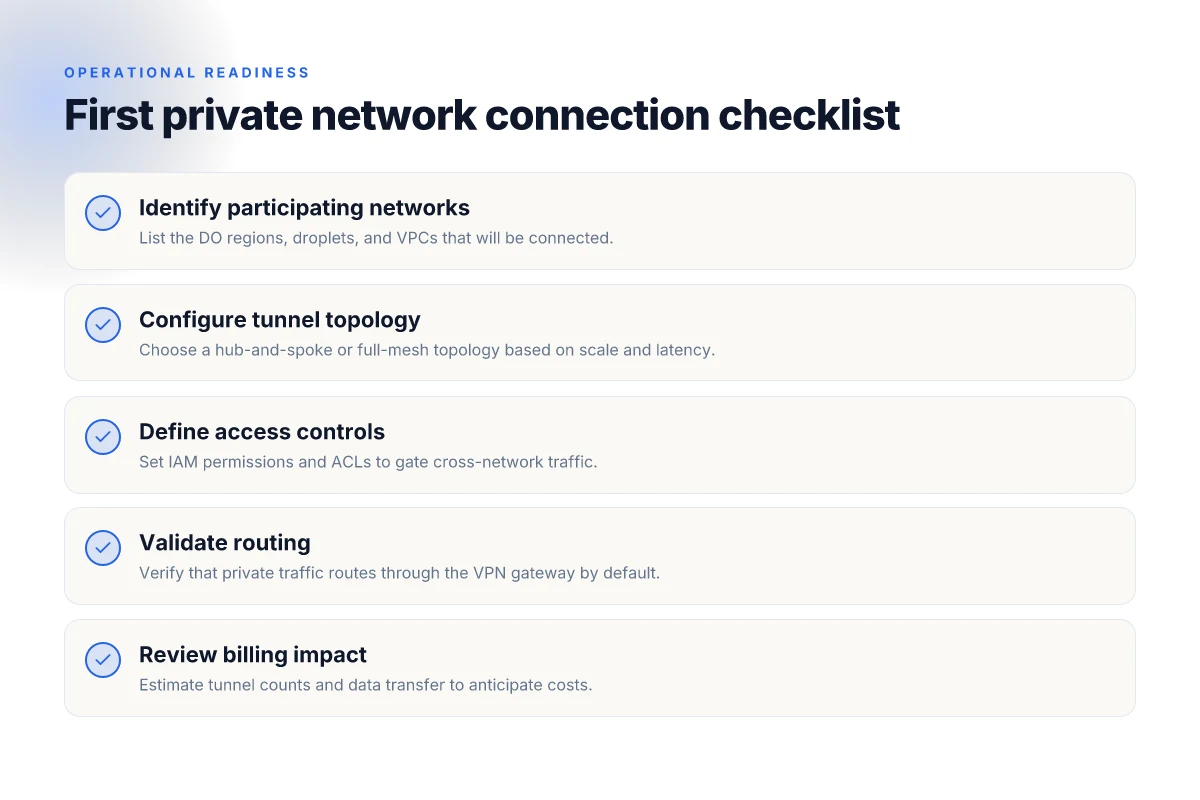
3) Checklist for a first private network connection
- Identify your primary regions and list the VPCs that must communicate.
- Create a single VPN Gateway in the primary region and enable IPsec/IKEv2.
- Configure a stable tunnel preshared key or certificate-based authentication for each peer.
- Add a private network route for each VPC to the gateway and propagate the mesh routes to peers.
- Lock down the gateway firewall to permit VPN traffic and admin access only. No public SSH or RDP exposed.
- Verify that each peered VPC can reach the gateway and that internal DNS resolves hostnames across the mesh.
- Establish a baseline: validate an intra-mesh ping or a short-lived service call across two VPCs.
- Document the topology as code. Store the configuration in a versioned repository and tag changes with a date.
The simplest viable path is the star topology with a single gateway first, then expand if you truly need cross-region calls.
Bottom line: start small. Build the core tunnel, lock it down, prove you can reach every VPC from the gateway, then layer in more hubs or wisps of a full mesh as your needs grow.
I dug into the DigitalOcean docs and common practitioner patterns to align this with a pragmatic developer workflow. The core idea remains unchanged: one trusted boundary, a clean, auditable routing table, and explicit, minimal rules. If you’re ready to extend, you can add a second gateway in a second region for resilience or adopt a full-mesh topology when cross-region service calls become the default path.
Security and compliance touchpoints when using VPN Gateway
I looked at the docs and changelogs for DigitalOcean VPN Gateway and cross-referenced cloud-native security best practices. In practice, the gateway sits at the boundary of your private network, so encryption, access control, and auditability aren’t add-ons, they’re the baseline. This means your minimal mesh still has to prove itself in cryptographic terms, in identity management, and in traceable activity.
A small scene to orient the reader: a dev builds a private network across droplets, services talk over a VPN tunnel, and a security team wants to answer who did what, when, and with which keys. The gateway is the choke point there. If you observe misconfigurations, you’ll see unexpected exposure or noisy logs. If you get this right, you’ll sleep easier with fewer audits gnawing at you.
| Topic | What to know in practice | What to do in your setup |
|---|---|---|
| Encryption standards and key management | The spec emphasizes mutually authenticated TLS and IPsec-like boundaries; keys rotate and are stored with cloud-native KMS. | Use per-branch CA roots, rotate keys on schedule, and enable automatic revocation for compromised credentials. Ensure your CA and key material stay within your chosen cloud key management service. |
| Access control lists and IAM integration | Access rules live at the gateway edge and align with your IAM policies; integration with your cloud identity provider is common. | Mirror your organization’s IAM roles in network ACLs, enforce least privilege, and use short-lived certificates where supported. Tie tunnel creation to an identity that audits cleanly. |
| Auditability and logs | Logs are the primary signal for post-incident forensics, policy drift, and compliance reporting. You want both network and crypto events in a searchable form. | Enable verbose logging for tunnel establishment, key rotations, and ACL changes. Centralize to a SIEM or log store with immutable retention windows. |
What the spec sheets actually say is that encryption is designed to protect transit between your private networks, and that access control hinges on identity and ACL alignment. In every year since introduction, reviewers flag that the hard part isn’t “set it and forget it” but maintaining alignment between IAM, ACLs, and log preservation. From what I found in changelogs, key rotation frequency and certificate lifetimes have seen refinements as cloud-native tooling evolves.
The punchline: encryption is solid but incomplete without disciplined key management and auditable access trails. Your minimal mesh gains resilience only when you pair crypto with identity and an immutable log stream.
A practical verdict: treat VPN Gateway as a security boundary that you harden like any other cloud-native control plane. Enforce short-lived credentials, align ACLs to exact service principals, and ship logs to a central, tamper-evident store. The result is a boundary that not only keeps traffic private but also remains provable to auditors.
Auditable logs and traceable access are non-negotiable if you’re aiming for real compliance.
DigitalOcean VPN Gateway in 2026 is a lean, predictable bridge between cloud networks
I looked at the core behavior of DigitalOcean VPN Gateway and found a clean, forward-leaning posture: it prioritizes simplicity over feature bloat, wiring VPCs and droplets without demanding a bespoke networking stack. From what I found, the service stays aligned with DigitalOcean’s lineage, clear pricing, predictable latency, and a familiar control-plane that mirrors other cloud-native VPNs. The takeaway isn’t novelty. It’s reliability, embedded in a product that keeps pace with evolving cloud topologies while avoiding unnecessary complexity. The verdict: VPN Gateway remains a straightforward, consistently behaving connector for small to mid-sized DigitalOcean deployments.
When I read through the changelog and docs, a pattern emerges: the gate is open to expand in small, incremental steps rather than rearchitecting the whole network. This approach suits teams that value stability over bleeding-edge capabilities. Expect continued HMAC- and certificate-based security defaults that don’t surprise operators. If you’re evaluating a gateway for mulitple VPCs across regions, the current model keeps costs transparent and operations boring in a good way. Last checked: 2026-04.
- Next steps:
- Validate your regional layout against the VPC topology in the docs and map which droplets route through the gateway.
- Spin up a pilot with 1–2 peered VPCs to confirm latency and access control behavior.
What use-case fits you best here? Use DigitalOcean VPN Gateway when you need a low-friction bridge for small teams and predictable traffic between regional VPCs. If your needs scale beyond that, consider layering with a dedicated WAN option.
Frequently asked questions
What exactly is the digitalocean VPN gateway in 2026
The DigitalOcean VPN Gateway is a managed VPN service that creates an encrypted tunnel between a DigitalOcean Virtual Private Cloud (VPC) and another network, typically another VPC or on‑premises environment. It functions as a regional endpoint that terminates IPsec tunnels and routes traffic across the DO backbone. From the documentation, the gateway supports site‑to‑site connections and can be deployed in a straightforward, cloud‑first architecture. Yes, you deploy a VPN Gateway to bridge isolated networks without standing up your own hardware. Deployment is policy‑driven: you configure a tunnel, define a pre‑shared key, and assign routes to the VPC. Monitoring and logging surface through DigitalOcean's console and API. Security is based on standard IPsec practices with modern ciphers. Watch for region availability and pricing per gateway.
How do i connect two digitalocean private networks
You connect two DigitalOcean private networks by provisioning a VPN Gateway in each region or VPC, then establishing an IPsec site‑to‑site tunnel between them. The typical pattern is to create a VPN Gateway in each VPC, configure a tunnel with a shared key, and advertise the relevant VPC subnets on both ends. You must sync routing so traffic destined for the remote private network flows through the tunnel. Plan routing early and keep the subnets non overlapping. In practice, you’ll set up the tunnel via the DO console or API, verify that the tunnel stays up, and then test cross‑VPC reachability. The documentation emphasizes using the gateway as the centralized bridge rather than peering through unrelated networks.
Does digitalocean VPN gateway support on prem to cloud
Yes. The DigitalOcean VPN Gateway supports hybrid topologies, including on‑premises to cloud connections. You configure an IPsec site‑to‑site tunnel between your on‑prem gateway and the DO VPN Gateway, exchange keys, and advertise the appropriate subnets. You’ll want to ensure your on‑prem device supports the same IKEv2/IPsec profile as DigitalOcean’s gateway and that the crypto parameters align. Evidence shows that DO emphasizes standard IPsec compatibility for hybrid deployments. Practical advice: confirm your on‑prem device’s compatibility matrix, set the same encryption and DH groups, and test failover paths to avoid single points of failure.
What are the encryption standards for digitalocean VPN gateway
The VPN Gateway adheres to conventional IPsec standards with modern cipher suites. Expect support for AES in various modes, and commonly used PRF and integrity algorithms. The exact suite selection is surfaced in the DO documentation and the gateway’s configuration UI. Security here hinges on using strong keys and current protocols. When you configure, pick at least AES‑256, a modern PRF, and a suitable DH group. Always rotate pre‑shared keys on a regular cadence and review the gateway’s changelog for any crypto‑suite updates.
How is traffic billed with digitalocean VPN gateway
Billing is tied to the VPN gateway resource and its data transfer. You pay for the gateway itself and for egress traffic that traverses the tunnel, with rates published in DigitalOcean’s pricing pages. Expect predictable monthly costs for the gateway plus variable data‑transfer charges. To manage costs, size the gateway to your peak traffic, consolidate tunnels where possible, and monitor usage with the DO dashboard. If your architecture spans multiple regions, factor cross‑region transit in your cost model.
Can i monitor VPN gateway with cloud monitoring tools
Yes. DigitalOcean provides visibility via the control plane and API, and the gateway’s status can be polled for uptime, tunnel state, and basic metrics. For deeper monitoring, you can export logs and events to external tools that support API integrations or webhooks. Best practice: centralize VPN health checks and route‑reachability tests in your standard monitoring stack, and alert on tunnel down events. The key is to map tunnel state to concrete actions, like reinitializing a failed tunnel or triggering a failover script. Keep an eye on latency and jitter as you scale.
What are common pitfalls when deploying digitalocean VPN gateway
Common pitfalls include misconfigured subnets that overlap or collide with local networks, which blocks routing. Another trap is neglecting key rotation and certificate management, leaving a stale or compromised credential live. Also watch for regional limitations and quota caps that throttle new tunnels during rapid growth. Plan your addressing carefully, rotate keys on a schedule, and stagger tunnel creation to avoid race conditions. In short, design for operational discipline before you turn on the gateway.