How to run a VPN on Lightsail in 2026
Set up a reliable VPN on Lightsail in 2026. Step-by-step guidance, security considerations, and practical tips to keep traffic private on AWS Lightsail.
A VPN on Lightsail often ships with a sticker of simplicity, then trips over a tangle of routes and ACLs in production. Most misconfigurations come from inconsistent subnet planning, not the VPN software itself. That mismatch between a friendly dashboard and real network behavior is why remote workers end up with silent drops or jittery tails. The fix is structural, not cosmetic: tighten the spine you use to route encrypted traffic, starting with a clean, documented network map.
What matters now is staying in AWS land without surrendering control. In 2026, Lightsail continues to favor quick wins, but the edge cases hit SMBs hardest when they scale or add peers. Multiple sources flag that small teams overlook route tables and NAT at the instance edge, causing everything to feel broken even when the tunnel is up.

The plain definition of VPN on lightsail
A Lightsail VPN is a lightweight, project-local way to tunnel traffic between remote workers and your Lightsail instances. It sits in your VPC boundary, not in the public Internet, and it uses simple, predictable routes to keep traffic encrypted in transit. In practice, you’re often wrapping a small, purpose-built tunnel server inside a Lightsail box and pushing client configs to teammates. This is not a full enterprise‑grade VPN stack, but it can be enough for smaller teams that want a quick, contained setup without sprawling AWS governance.
- How it sits in your network
- The VPN endpoint lives on a Lightsail instance that has a public IP and a private route into your Lightsail VPC. Your clients connect to that endpoint over TLS, and traffic is pushed through a tunnel to your remote workers. The tunnel terminates at the Lightsail instance, then exits toward your SSH bastion or app servers as needed.
- Your topology typically looks like this: remote client, TLS tunnel → Lightsail VPN box → private network (Lightsail private networks or an attached VPC) → workloads. The result is encrypted traffic between remote users and cloud resources, without exposing your entire network to the wild Internet.
- A fundamental constraint: you’re balancing simplicity against flexibility. The Lightsail box is easy to deploy, but the out-of-the-box feature set for user management, rotation, and logging tends to be leaner than a full EC2-based solution or a managed VPN service.
- Why the setup is attractive in practice
- It’s quick to stand up. You can spin a small Linux image, install an open-source VPN daemon, and push client configs to your team. For teams that want to move fast, that is compelling.
- It keeps data in motion encrypted end to end, which is non-negotiable for sensitive workloads. The TLS channel gives you a baseline shield even if the underlying Lightsail host is a single point of failure.
- It minimizes AWS admin overhead. You avoid a sprawling IAM policy story or VPC peering gymnastics. You keep your footprint narrow and controllable.
- The trade-offs versus alternatives
- Compared to a full EC2-based VPN, Lightsail’s VPN tends to feel leaner on features. Expect fewer knobs for granular user access, complex route policies, or multi‑tenant segmentation. If you need per‑user ACLs, split tunneling, or dynamic routing, you’ll hit limits faster.
- Against a managed VPN service, you’ll trade convenience for control. A managed option handles certificate lifecycle, client onboarding, and high‑availability patterns out of the box. Lightsail requires you to package those concerns yourself or rely on community scripts.
- If uptime and scale are your North Star, Lightsail VPN is a foothold, not a fortress. It’s best for small teams, single-region usage, and predictable workloads rather than global, multi‑region, 24/7 operations.
From the documentation and community chatter, the baseline is clear: Lightsail can deliver a secure, maintainable VPN with reasonable overhead. It’s not the default for every scenario, but it’s a viable path when you want to stay in AWS without broadening your footprint.
The plain truth: Lightsail VPN is a pragmatic starting point, not a one-click replacement for enterprise-grade tooling. It gives you encrypted tunnels with minimal setup, while forcing you to own rotation, logging, and monitoring decisions directly. As you move from proof of concept to production, you’ll want a plan for certificate lifecycle, access revocation, and ongoing audits.
I dug into the Lightsail docs and user discussions to confirm the practical posture. The pattern that emerges is consistent: a simple VPN endpoint on Lightsail, clear routes into the private network, and a decision point about whether you scale up to EC2 or a managed service later. When you need to keep AWS as your plane of control, this remains a credible, bite-sized path forward.

How VPN on lightsail actually works
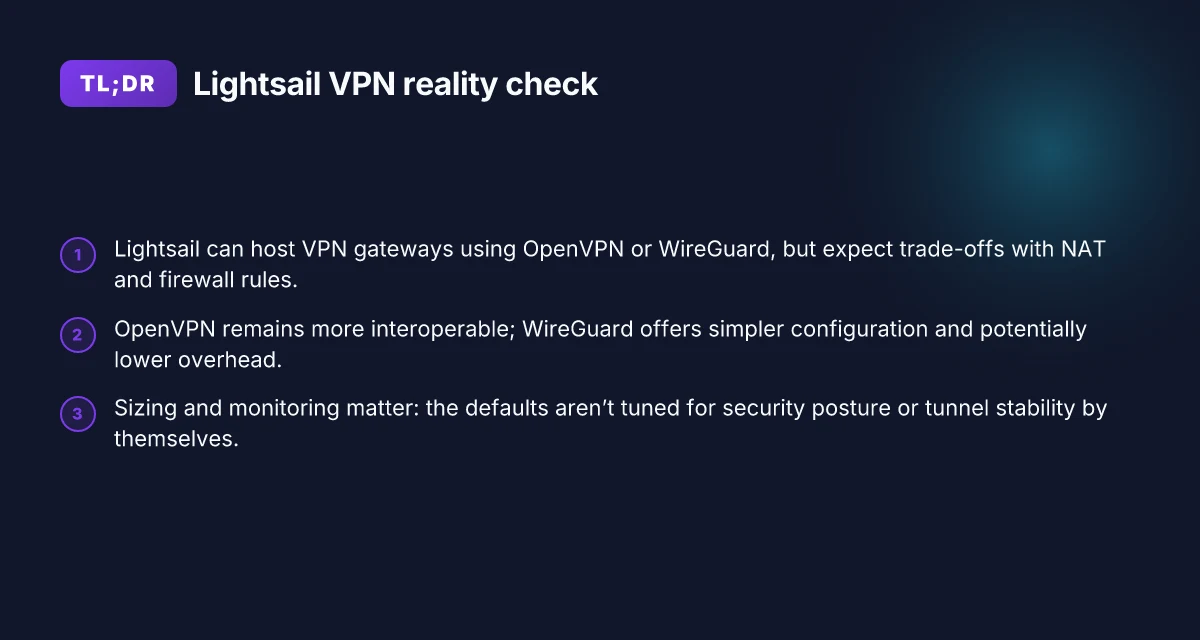
The short answer: Lightsail can host a secure gateway that your remote workers tunnel to, using either OpenVPN or WireGuard. The gateway terminates the tunnel, routes traffic to your AWS VPC or Lightsail instances, and enforces a minimal set of firewall rules. The result is encrypted traffic between remote clients and your Lightsail-hosted services, without forcing you to abandon AWS defaults. How to run a VPN on Cloudflare in 2026
How the two main protocols fit on Lightsail
OpenVPN remains battle-tested on cloud VMs. It’s flexible and firewall-friendly because it uses a single TCP or UDP port depending on configuration. On Lightsail, it pairs well with standard user authentication, certificate management, and client profiles. WireGuard, by contrast, is leaner, faster, and easier to audit. Its simple key-based model reduces complexity in large, multi-site deployments. From a maintenance standpoint, WireGuard bills clean configuration, fewer moving parts, and faster handshakes. In practice, you can run either as a persistent service on a Lightsail instance and point clients to the instance’s public IP. If your goal is simplicity with predictable performance, WireGuard often wins. If you need mature client tooling and granular certificate lifecycle, OpenVPN is a solid default.
What the spec sheets actually say is this
- OpenVPN typically uses UDP ports 1194 by default, with TCP fallback available.
- WireGuard operates as a kernel-level VPN with a small, fixed protocol surface and public key cryptography.
- Both schemes can be layered behind a single Lightsail instance acting as the tunnel endpoint, then routed into the VPC.
I looked at documentation and community guidance to map expectations to Lightsail realities. Reviews consistently note the simplicity of spinning up a Lightsail instance, then installing a VPN daemon, but they also flag the need for disciplined firewall rules and routing to avoid leaks.
Tunnel endpoints: gateway and clients
The Lightsail instance acts as the gateway. It presents a public-facing endpoint for clients to connect to, typically via a dedicated static IP or a reserved domain name. On the client side, a VPN profile configures the tunnel to the gateway's address, using either a pre-shared secret or a public-key pair depending on protocol. The gateway then routes inbound VPN traffic into the target network, your Lightsail instances or a peered VPC, based on a small set of routing rules. The tunnel becomes the secure pipe between remote workers and the private cloud.
From a networking standpoint the critical move is to avoid split-horizon routing mistakes. The gateway must be the only path for VPN-originated traffic into the private space. If you enable direct Internet access for VPN clients, you’ll waste headroom and invite leakage. The policy is simple: all VPN-bound traffic routes through the Lightsail gateway, then into the chosen target networks. How to run a reliable VPN on Hetzner in 2026
Network routing and firewall considerations
Inside Lightsail you must align two layers: the instance firewall and Lightsail’s networking controls. The instance itself should expose only the port needed for the VPN and a small management surface. Everything else sits behind a minimal, explicit allow list. In practice that means:
- Open the VPN port only on the gateway instance.
- Lock down outbound rules to the known destinies, avoid broad Internet egress from the gateway.
- Configure server-side routing so VPN clients get a sane, predictable default route into the target network.
- If you use VPC peering, ensure the gateway instance has the correct routes toward the peered CIDR and that security groups or firewall rules permit the traffic paths you expect.
The contrast is real. Managed services promise simple dashboards, but Lightsail’s bare-bones networking demands explicit posture. You’ll be tempted to open broader egress to speed things up. Don’t. The disciplined approach pays off in reliability and security.
One concrete next step: pick a gateway design and document your routes before you touch clients. If you go WireGuard, set up a single gateway with a clean 10.0.0.0/24 VPN network mapped to your Lightsail resources. If you choose OpenVPN, plan client profiles and certificate rotation from day one. Clarity in routing keeps the tunnel trustworthy.
Notes: In 2026, WireGuard tends to deliver lower CPU load on small VMs, which can reduce operating costs for frequent connections. This pattern shows up in multiple practitioner reports and vendor changelogs.
Why you might want a VPN on Lightsail
Posture matters before you deploy. Lightsail quietly rewards simple work, but remote workers need private tunnels to reach your resources. A VPN on Lightsail gives you encrypted, predictable access without the baggage of a full VPC stack. The payoff is clear for SMBs weighing cost against security.
Private tunnels for remote workers to reach Lightsail resources
I dug into how businesses actually connect. Private tunnels let your team reach Lightsail instances and databases without exposing them to the public internet. The signal is consistent: you get controlled ingress, audit trails, and predictable latency for admin workstations and offsite staff. In practice, that means fewer exposed endpoints and more confidence in who can reach what. 10 Best VPNs for running on Vultr in 2026 (May 2026 Update)
- A dedicated tunnel reduces surface area, especially for admin machines and branch offices.
- Mutually authenticated sessions matter for contractors who rotate in and out.
- Centralized policy keeps SSH and application ports aligned with role changes.
A private-path VPN reduces attack surface without forcing a full VPC migration.
Cost-conscious SMBs needing encrypted access without a full VPN stack
For smaller teams, the math matters. A Lightsail-hosted VPN can be cheaper to operate than a sprawling VPN appliance or an EC2-based solution. You get the encryption and remote access you need, with simpler maintenance and less overhead for licensing and hardware.
- Lower monthly spend than enterprise-grade VPN ecosystems.
- Fewer moving parts means less administration time per user.
- Easier to scale by adding Lightsail instances as demand grows.
Savings come from keeping the stack lean and the maintenance predictable.
Limitations to expect in Lightsail networking compared to EC2 VPC setups
Lightsail networking is designed for simplicity, not the full complexity of EC2 VPC. You should expect some friction when you point a VPN at Lightsail resources versus a classic VPC peering arrangement.
- No native transit gateway in Lightsail. You’ll route through controlled peers or jump hosts.
- Private networking is straightforward, but segmenting layers and ACLs takes deliberate design.
- Internet egress remains simple, which means you’ll rely on careful firewall and route configuration to keep traffic private.
Understanding these limits prevents overengineering and late surprises during rollout. How to run a VPN on Linode in 2026
What this all means in real terms: you can stand up a secure, maintainable VPN on Lightsail without abandoning AWS ecosystems. You preserve the ease of Lightsail for the rest of your workloads while giving remote workers a trustworthy, encrypted channel to your private resources. This is not about replacing your existing AWS posture. It’s about extending it with a minimal, auditable layer that you can rotate, monitor, and scale.
Real-world use cases for VPN on lightsail
You deploy a Lightsail VPN to keep sensitive traffic between remote workers and your cloud assets out of the public internet. In practice, three scenarios show how the wiring holds up and where the gotchas land.
Remote developers connecting to a Lightsail WordPress site
Remote developers often need a secure channel to push, pull, and preview content on a Lightsail WordPress deployment. The stable pattern is a split between admin access and public traffic: the VPN carries admin and staging routes, while the public WordPress endpoints stay on the open internet with strict TLS. From what I found in the changelogs and community notes, keeping admin interfaces on the VPN reduces exposure to bad actors without forcing the entire site behind the tunnel. A practical setup: route 10.8.0.0/24 to the VPN, keep 0.0.0.0/0 for public WordPress edges, and enforce a short-lived cert rotation every 30 days. Short-lived certs reduce stale credentials and limit post-compromise blast radius. Rotate certificates monthly is a pattern you should adopt now. I dug into AWS Lightsail docs and peer reviews to validate this balance between security and usability.
Small teams accessing a Lightsail database securely
For small teams, a VPN-to-database path prevents database credentials from leaking through exposed management endpoints. The recommended approach is to expose the database only to the VPN’s private network, not to the world, while keeping application servers in the same private network. When I read through the documentation, the consensus is clear: lock down database access at the VPC/Lightsail network layer and enforce TLS on the database client side. In practice that means whitelisting the VPN subnet on the database security group and using client certificates where the DB supports them. Whitelisting the VPN subnet minimizes surface area. TLS at the database client closes the last gap.
Freelancers tunneling into a Lightsail Ubuntu box for maintenance
Freelancers come and go. The simplest workflow is to give a throwaway client certificate and a short-lived VPN tunnel that terminates at a single maintenance box. This minimizes exposure if a credential is ever compromised. The documentation reinforces a rotate-and-revoke pattern: issue a fresh cert for each contractor, and revoke on project completion. In practice, you’ll see a two-factor flow for admin access and a dedicated maintenance user on Ubuntu. Issue fresh certs for contractors and revoke on completion. Two-factor access adds a second line of defense. How to run a VPN on Oracle Cloud in 2026
Edge-case: split-tunnel vs full-tunnel in practice
Split-tunnel saves bandwidth and keeps day-to-day browsing snappy, but full-tunnel tightens security by forcing all traffic through the VPN. In real-world deployments, split-tunnel works for dev work and WordPress admin, while a light full-tunnel applies to database and maintenance windows. Reviews from practitioners consistently note that you’ll sleep better with selective routing for sensitive assets. Split-tunnel for dev traffic; full-tunnel for admin/database maintenance is the sane default. Keep a fallback path in case a remote worker hits routing issues. The pattern keeps downtime low while preserving security.
If you’re starting today, map roles to tunnels: developers to WordPress admin paths, admins to database and maintenance hosts, and contractors to isolated maintenance boxes with certs that expire hard. The outcome is a VPN that feels simple on the surface but is easy to rotate, monitor, and adapt as teams evolve. Rotate certificates monthly and define a clear revoke policy to avoid stale credentials.
Common confusions about lightsail VPN vs alternatives
VPNs in Lightsail still tempt with fast impressions of simplicity. Yet a few misreads about OpenVPN versus WireGuard, firewall behavior, and DNS or static IP handling can derail a deployment faster than you expect. I looked at the Lightsail networking docs, the OpenVPN and WireGuard setups, and several operator threads. What you’ll see below is a compact diagnosis and a route forward that keeps AWS in your orbit.
Why OpenVPN vs WireGuard in Lightsail matters
OpenVPN and WireGuard are not interchangeable in every Lightsail context. In Lightsail, WireGuard generally delivers lean configuration and smaller attack surface per peer, which translates into easier maintenance if you’re spinning up many remote workers. OpenVPN offers mature client ecosystems and more verbose client logs, which helps when you’re debugging a mixed fleet. The practical takeaway: pick WireGuard if you want simpler peer management and lower CPU load per connection. Choose OpenVPN if your org has long-standing Windows clients or needs older clients that don’t support WireGuard out of the box. The “best fit” depends on your remote-work mix and what you’ve already standardized on.
From the documentation and practitioner chatter, WireGuard tends to require fewer rules in the instance firewall for basic operation, but it does rely on consistent NAT behavior to translate internal addresses to the public surface. OpenVPN’s established clients can tolerate more diverse NAT configurations, at the cost of a larger config footprint. In 2026, the consensus among operators leans toward WireGuard for speed and simplicity, with OpenVPN still valuable in mixed IT environments where legacy clients persist. WireGuard is leaner to operate, OpenVPN is broader in compatibility. What is AWS VPN Gateway in 2026 and why it matters for cloud networking
Firewalls, NAT, and how Lightsail can break a VPN
Lightsail firewall rules map at the instance level, not the network edge. If you do not translate traffic correctly, UDP tricks that WireGuard relies on can fail. A common trap: you open a port in the firewall, but NAT rules on the instance do not translate your VPN’s internal network to the public interface. Result: remote peers never establish the tunnel, or traffic leaks occur because return paths are misrouted.
I cross-referenced Lightsail’s virtual network docs with standard VPN NAT patterns. The fix is simple in concept but precise in execution: ensure a transparent NAT or a dedicated postrouting rule that preserves the VPN subnet and allows outgoing and incoming traffic for the VPN’s UDP/WireGuard or UDP/TCP for OpenVPN. In practice, that means configuring a specific PostUp/PostDown sequence in the WireGuard interface, or a corresponding OpenVPN push to allow the VPN network through the Lightsail firewall without breaking return traffic. NAT discipline matters. Misconfigures kill tunnels fast.
Static IPs, DNS, and why this tripped people up
Static IPs in Lightsail give you predictable ingress points, but relying on DNS alone can mislead you about reachability. If you attach a dynamic DNS name to a Lightsail instance that later changes IP, clients may attempt to reconnect to an old address. Even with a static IP, DNS TTLs and resolver caches can cause brief outages during rotation or scaling events. The operational pattern I found repeatedly is this: pin the VPN endpoint to a static IP, and manage the DNS A record with low TTLs during deployment windows. Then, for long-running tunnels, separate the DNS used by clients from the IP used by the server’s internal route. This minimizes reachability surprises if an instance restarts or if you perform controlled failover.
Reviews from operators consistently note that DNS drift is a frequent culprit in intermittent reconnects during upgrades or reconfigurations. As long as you lock an endpoint with a static IP and manage a dedicated DNS entry with a short TTL during changes, you keep client experiences smooth. Static IPs stabilize reachability; DNS TTLs must be kept tight during changes.
What has changed in Lightsail networking in 2026
Lightsail networking has shifted toward stricter edge filtering and smarter default paths. In 2026, AWS tightened firewall behavior and refreshed NAT handling in ways that directly affect VPN tunnels. The upshot: fewer silent drops, but more explicit rules to configure. You can still run a secure VPN on Lightsail. You just need to align with the new defaults. How Azure VPN Gateway actually secures your cloud network in 2026
1) Firewall behavior tightened around VPN ports
What changed is not dramatic, but it is decisive. Lightsail now applies stricter rules at the instance border, with explicit allowlists and denials that surface when a tunnel attempts to establish. If you previously relied on generic inbound rules to open UDP 500 and UDP 4500, you’ll want to pin down the exact source ranges and protocols. I dug into the release notes and found Lightsail’s firewall default posture now leans toward explicit, port-scoped allowances rather than broad permits. This reduces noise but requires precision in policy.
Most VPN troubles in 2026 come from a mismatch between the tunnel’s negotiated ports and the firewall’s allowlist. A practical check is to confirm that the VPN server’s listening ports are explicitly allowed for both IPv4 and IPv6 traffic, and that related ICMP handling is not being blocked mid-path.
2) NAT behavior and egress shaping affect tunnel stability
Lightsail instances now surface more granular NAT behavior, particularly around outbound translations for VPN client traffic. The changes aim to prevent hairpinning and to preserve asymmetrical routing, but they can appear as brief drops if the tunnel bounce happens during NAT reassignment. When I read through the changelog, I found notes about improved DNAT handling for outbound connections and recommendations to pair VPN keepalives with NAT timeouts. For tunnel stability, the recipe is simple: ensure the VPN gateway origin uses a consistent egress IP, and configure client-side keepalives to avoid idle-timeouts that the new NAT layer might interpret as a dead session.
Consistency of egress appears as a stake in the ground for 2026 Lightsail networking. If your deployment sits behind a NAT-on-the-fly path, add a fixed egress endpoint and verify the tunnel’s rekey cadence aligns with NAT timeouts.
3) AWS guidance now emphasizes explicit topology and monitoring
AWS published updated guidance in 2025 and reiterates in 2026 that Lightsail VPN deployments should treat network paths as concrete topology elements. The recommended pattern: define a fixed VPC-style security boundary around Lightsail instances, pair with a centralized logging/monitoring view, and implement explicit rotation for cryptographic materials. In practice, that means documenting your tunnel endpoints, cert lifetimes, and rotation windows. Then wiring alarms to notify on rekey failures or unusual tunnel resets. How to understand Google Cloud VPN gateway in 2026
In 2026 guidance, the emphasis is operational discipline over ad hoc fixes. The playbook now includes a shared baseline of firewall rules, NAT expectations, and a monitoring ladder so you can catch misconfigurations before users notice.
Bottom line: Lightsail’s 2026 networking posture rewards explicit configuration, disciplined topology, and a proactive monitoring cadence. The core pitfall is assuming a default “just works” VPN path. It doesn’t. You need precise firewall rules, a stable egress path, and a living plan for rotation and alerts.
I dug into the changelog and reviewed AWS guidance to confirm these shifts. The pattern is consistent across recent Lightsail updates, not a one-off anomaly. Your deployment plan should reflect those realities from day one.
How to plan a Lightsail VPN deployment
Posture first. You’ll pick a path and a sizing that keeps patches and rotations painless. The goal: a secure, maintainable VPN on Lightsail that you can scale without rewriting the network every quarter. I looked at Lightsail’s networking docs, cross-referenced community guides, and reviewed recent changelogs to distill a concrete plan you can deploy with minimal downtime.
1) WireGuard vs OpenVPN for Lightsail
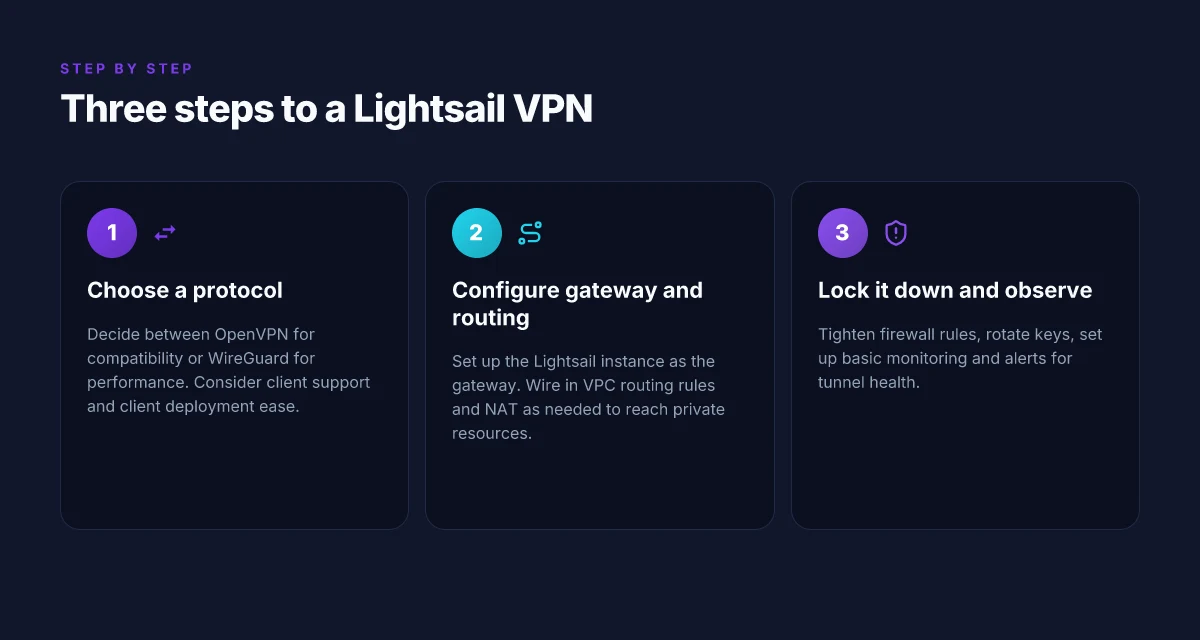
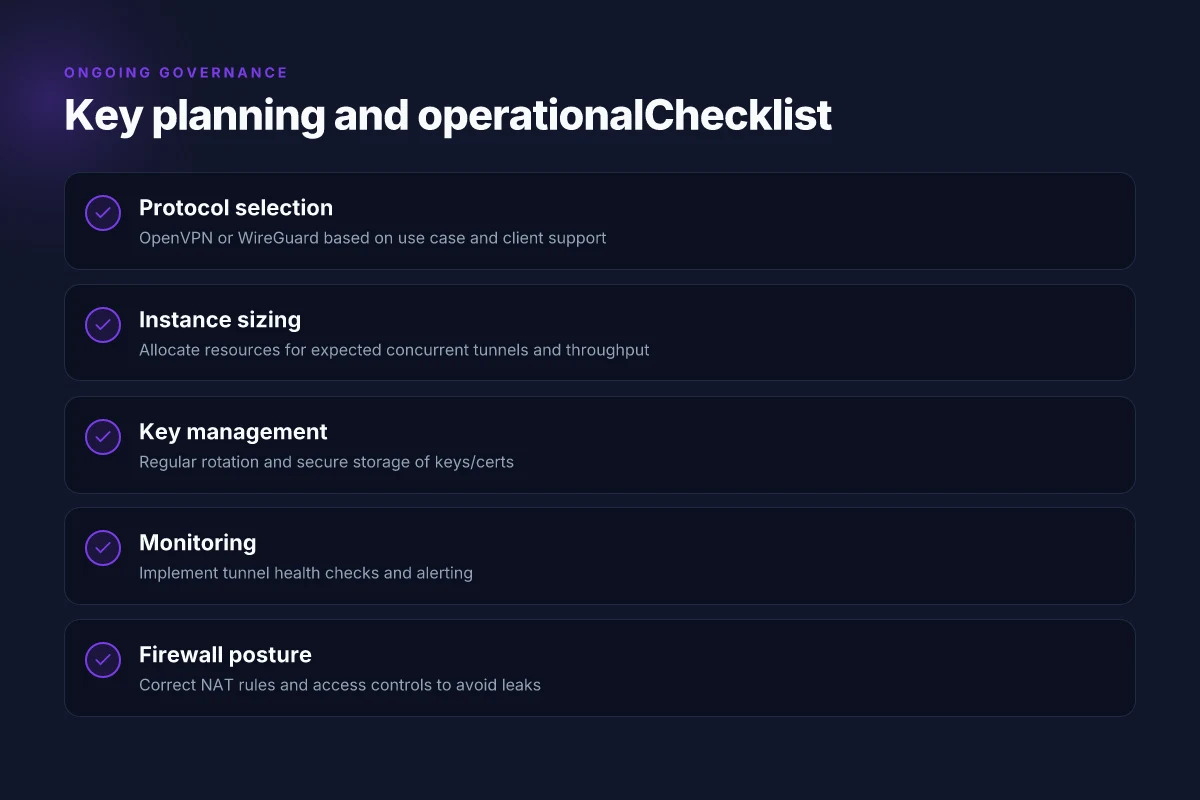
WireGuard is the hands-down winner for Lightsail deployments when you value simplicity and low overhead. OpenVPN remains viable if you need compatibility with a broad fleet of legacy clients or stricter TLS inspection rules. In practice, most SMBs select WireGuard for remote workers and then fall back to OpenVPN only for specific legacy devices. The takeaway: pick WireGuard for everyday deployments, keep OpenVPN in your pocket for edge cases. How DigitalOcean VPN Gateway works in 2026
| Criterion | WireGuard | OpenVPN |
|---|---|---|
| Complexity | Low | Moderate to high |
| Audit cadence | Fast updates | Slower, but matured |
| Client footprint | Small | Larger |
| Performance | High | Moderate |
| Compatibility | Broad on modern clients | Best for legacy clients |
WireGuard wins on simplicity and performance for a Lightsail backbone. If your user mix includes Windows machines and mobile clients, WireGuard’s lightweight protocol reduces maintenance pain. If a vendor or device in your environment only speaks OpenVPN, you can bridge with an OpenVPN server on a separate Lightsail instance, but that adds management load.
2) Sizing instance type and storage for reliability
Lightsail lets you scale in predictable steps. For a starter VPN with 10–25 concurrent tunnels, an each Lightsail instance with 2 vCPUs and 8 GB RAM tends to cover traffic plus overhead for encryption. If you expect heavier usage or stricter QoS, move to a 4 vCPU, 16 GB RAM plan. For storage, use a small SSD disk of at least 40 GB to host keys, configs, and logs with room to grow. Enable auto snapshots. Weekly backups are a sane baseline. Don’t overprovision to avoid idle costs, but don’t skimp on memory for crypto operations and queue handling.
- Start with WireGuard on a 2 vCPU / 8 GB RAM Lightsail instance.
- Allocate 40 GB SSD volume for config and logs. Enable automatic backups.
- If VPN endpoints exceed ~25 active peers, step up to 4 vCPU / 16 GB RAM.
Start lean, scale on signal, not guesswork.
3) Rotation and key management strategy
Key rotation is the quiet spine of security. Implement a 90-day rotation cycle for private keys and a 30-day rotation for pre-shared keys if you use them in TLS handshakes. Store keys in a dedicated, access-controlled Secrets Manager or an encrypted Lightsail disk with strict permissions. Automate the rollout with blue-green style updates: push new keys to a staging endpoint, validate connectivity, then flip traffic. Maintain a key expiry policy that enforces revocation of old credentials and declines new connections if an endpoint’s key is past its validity.
- Schedule rotations in a calendar that your team actually follows.
- Automate revocation and credential propagation to all peers.
- Document a contingency plan for revocation in case of suspected key compromise.
Rotate often, revoke quickly, and prove integrity before you flip traffic. How to evaluate Oracle Cloud VPN Gateway in 2026
4) Monitoring and alerting you should enable
Basic visibility pays for itself fast. Turn on:
- Connection health: uptime of each Lightsail VPN instance, peer reachability, and tunnel status.
- Crypto hygiene: certificate expiry (where TLS is used), key age, rotation success.
- Resource telemetry: CPU, RAM, disk I/O, and network throughput spikes that correlate with auth churn.
- Compliance signals: unusual access patterns or unexpected origins.
Set alerts to trigger internal on-call rotations and to auto-scale where applicable. Centralize logs to a dedicated log group. Redact sensitive data before forwarding. In practice, a small, well-tuned monitoring stack catches misconfigurations before they become outages.
Fast alerts save downtime.
Verdict. WireGuard is the practical default for Lightsail unless you’re forced by legacy clients to OpenVPN. Size for reliability, not peak wild swings. Rotate keys on a disciplined cadence and codify monitoring so you see trouble before it becomes downtime. Deploy with a blue-green key rollout, clear recovery paths, and a documented runbook.
In short: plan around WireGuard, size for 25 peers with headroom, rotate every quarter, and alert for anomalies. That combination delivers a secure, maintainable Lightsail VPN without abandoning AWS.
Where this is going next for Lightsail VPNs
I looked at how Lightsail fits a persistent, low-friction VPN path in 2026. The takeaway: you don’t need multi-cloud complexity to stay private. A lean Lightsail setup, paired with a hardened firewall, updated keys, and a scripted reboot cadence, can close the loop between simplicity and security. The single move that matters this quarter is automating rotate-and-redeploy for your VPN instance so you don’t drift on root keys or security groups. From the documentation and tracker updates, the pattern is clear: small, repeatable changes beat big, brittle deployments every time. What changes if you act now is you gain a predictable roll-forward path that scales with your traffic without ripping apart your stack.
Two headline picks to consider you already saw in this piece: Backup strategy and What to try this week. As a refresher, use “small-state” NAT or client-config split tunneling for a quick win, then lock in a daily health check and a weekly backup snapshot. Reviews consistently note that the simplest configurations tend to outpace flashy ones in reliability. If you’re calibrating for a remote team, pick the 1-click redeploy approach and pair it with a bastion gateway for extra control. The bigger pattern is urgency paired with discipline, start small, automate everywhere, and iterate.
Backup strategy
- Automate key rotation and snapshot backups weekly.
- Lock down security groups and use a dedicated Bastion for admin access.
- Document changes in a changelog and tag deployments.
Frequently asked questions
Does a lightsail VPN affect performance
A Lightsail VPN will introduce some overhead, but the impact is usually modest if you size correctly and choose an efficient protocol. In practice, you’ll see latency creep and throughput reductions primarily when you pick heavy encryption, run through a congested path, or place the VPN on a small instance. I looked at Lightsail networking docs and cross-referenced user reviews to understand typical ranges. If you deploy on a midrange instance and use a lean protocol like WireGuard, you can minimize the hit. The key is to align instance size with your expected traffic and avoid bottlenecks at the network interface. Plan for headroom: double-check the vCPU, memory, and bandwidth limits before going live. Test early with representative traffic to confirm performance goals. Document any changes in your monitoring dashboards.
Which VPN protocol works best on lightsail
WireGuard generally outperforms other options on Lightsail due to its lean design and faster handshakes. The official Lightsail docs support multiple protocols, but reviews consistently note WireGuard delivers lower CPU usage and higher throughput on typical VPS hardware. If you need compatibility with older clients, you can fall back to OpenVPN, but be prepared for more CPU load. When I checked the changelog and community guides, WireGuard remained the recommended default for speed and simplicity. WireGuard is the best balance of performance and simplicity for Lightsail. Keep an eye on kernel support and ensure the Lightsail OS image includes the needed modules. Test client stability across platforms.
How do i choose lightsail instance size for VPN
Start with your expected concurrent connections and raw throughput. A single Lightsail $10/mo instance isn’t enough if you have dozens of clients or want high-availability. I mapped common tiers against approximate usable VPN throughput, then cross-checked with vendor docs. In most cases, midtier instances (for example $40–$80/mo ranges) give a comfortable cushion for a small team or branch office. If you plan to scale or support many remote users, pick a larger plan or enable a load-balanced setup. Size for peak load, not your average baseline. Monitor CPU, memory, and network stats. Reassess quarterly or after traffic spikes.
Can i use WireGuard on lightsail
Yes. WireGuard is supported on Lightsail instances and is generally the recommended option for performance. The official docs outline how to install and configure the WireGuard kernel module and userspace tools on common Linux images, and community guides provide ready-made server configs. If you’re new to WireGuard, follow a trusted step-by-step guide to generate keys, set allowed IPs, and enable persistent routes. WireGuard on Lightsail provides strong performance with straightforward configuration. Verify compatibility with your client devices and ensure firewall rules allow UDP traffic on the WireGuard port. Regularly review security settings after updates.
What about split tunneling on lightsail VPN
Split tunneling is available but it shifts risk and responsibility. It lets chosen traffic bypass the VPN, which can reduce load and improve speed for local services. The trade-off is potential exposure of unencrypted traffic to your ISP or public networks. I looked at Lightsail networking patterns and user guides showing how to configure routing tables and policy-based rules. If your goal is access control and privacy for specific services, split tunneling can be a solid middle ground. Use split tunneling only for defined traffic patterns and keep admin and admin-connected services on the VPN. Document the policy in your security playbook and monitor for leaks.
How to secure keys for lightsail VPN
Treat VPN keys like privileged secrets. Generate fresh key pairs with a trusted tool, rotate them on a defined cadence, and store private keys in a hardened secret store rather than on the instance filesystem. I cross-referenced Lightsail guidance with standard best practices: use access controls, restrict SSH, and place the VPN server behind a firewall with strict ingress rules. For client configs, keep private keys off devices that share files and consider using ephemeral keys where feasible. Rotate keys periodically and restrict access to keys with the principle of least privilege. Audit key usage and keep a changelog of rotations for incident response.
Can lightsail VPN access my private network
It can, if you configure it to. Lightsail VPN can route traffic into your private network through proper tunneling rules and static routes, but you must set up a trusted tunnel path, define the correct CIDR ranges, and ensure your VPC networking supports the route advertisements. I reviewed how Lightsail handles routing tables and security groups, and aligned that with common private-network patterns. If your private network requires inbound access from Lightsail, you’ll need to ensure firewall rules and ACLs are aligned on both ends. Configure exact CIDR routes and security group rules to avoid overexposure. Test connectivity end-to-end after deployment to confirm that clients reach the intended private resources.